Porsche Radio Code Finder | Get Your Car Radio Code Instantly
Porsche Radio Code Finder
 |
 |
 |
 |
Hello Dear Porsche Owners,
Did your radio lock up after a battery replacement or an electrical interruption in your Porsche? If you see a warning on the screen asking you to enter a code (CODE / SAFE, etc.), your device’s security system has been activated. To continue enjoying your music where you left off, you need to enter the original security code made specifically for your radio.
In this guide, we will explain how you can easily find the lock codes of the Becker and Blaupunkt brand radios used in Porsche vehicles, with the help of the serial number written on the label on the device.
Once you know your serial number, you can get your code instantly by using our Online Porsche Radio Code Finder Service at the bottom of the page.
Important Step: Where Is the Porsche Radio Serial Number?
To calculate your radio’s code, you need to remove the device from its slot and find the serial number on the label on its body. Two different radio brands may be found in a Porsche; the serial number is written differently for each brand.
1) Becker Radio: How to Recognize the 14-Character Serial Number
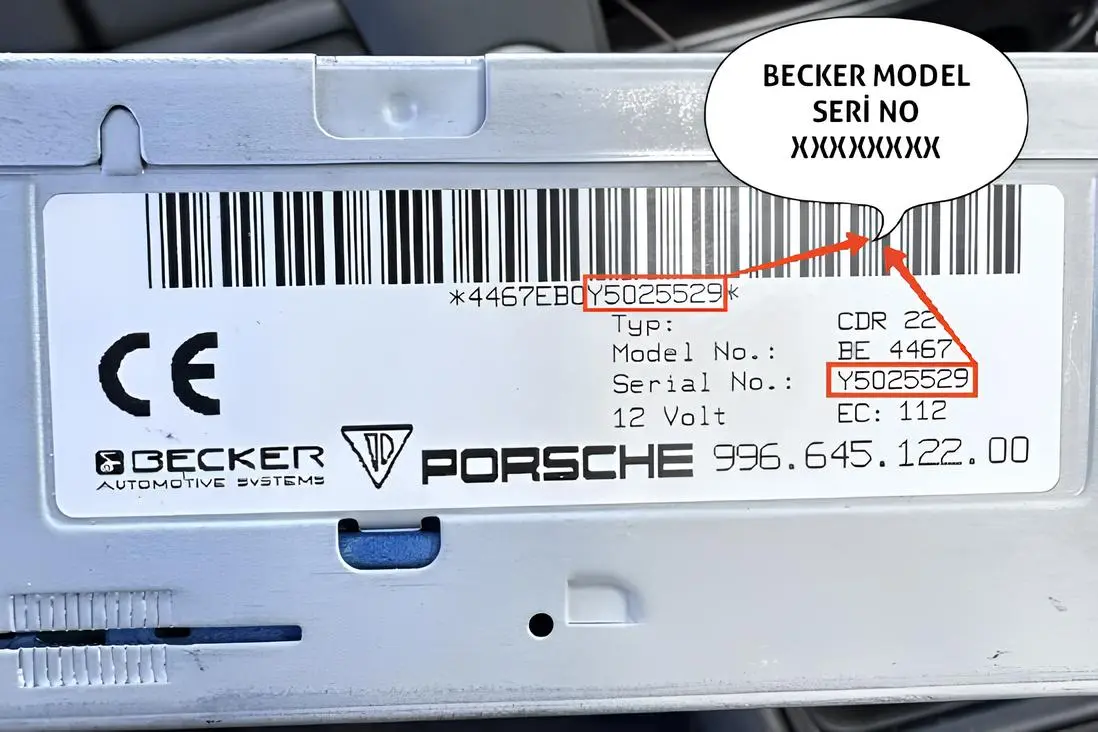
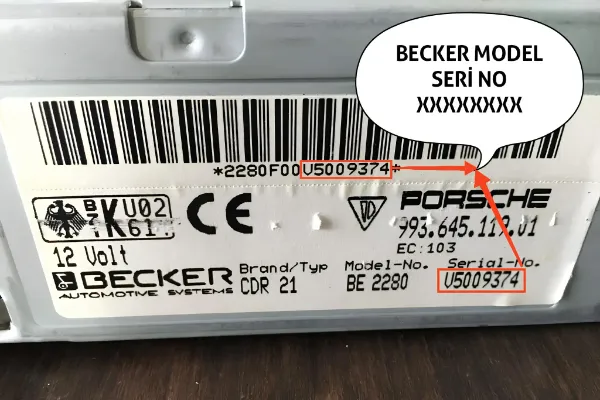
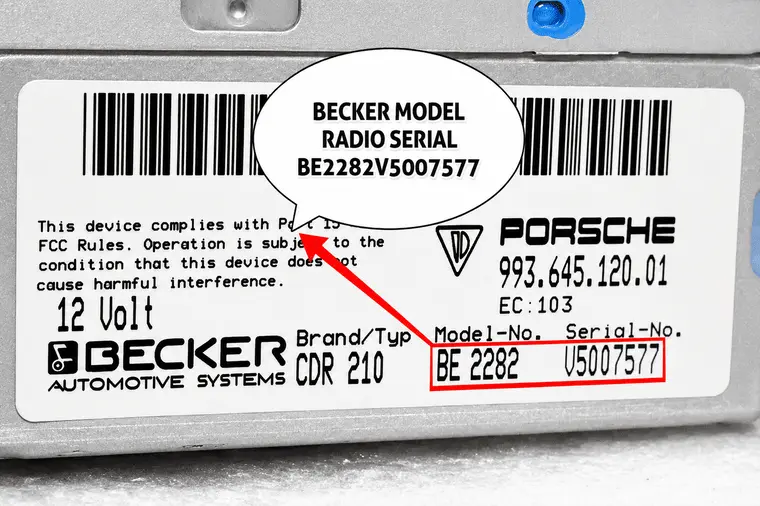
- Written in the Model No. and Serial No. Fields: There are two fields on the label of Becker radios: Model-No. (e.g., BE 4467 or BE 2280) and Serial-No. For the lookup, you need to combine these two values to form a single 14-character code.
- It Is 14 Characters Long: The full code is formed by combining the BE + 4-digit model number in the Model-No. field with the Serial-No. value that follows it, and is 14 characters long in total.
- Do Not Enter Only the Serial No.: Entering only the Serial No. field is not enough — to get the correct 14-character code, you need to combine it with the Model-No. (BE XXXX).
- Example: If the label says Model-No.: BE 4467 and Serial-No.: X5009788, you must combine them and enter BE4467X5009788 in full into the lookup field.
2) Blaupunkt Radio: 14-Character Serial Number Starting with BP or P0
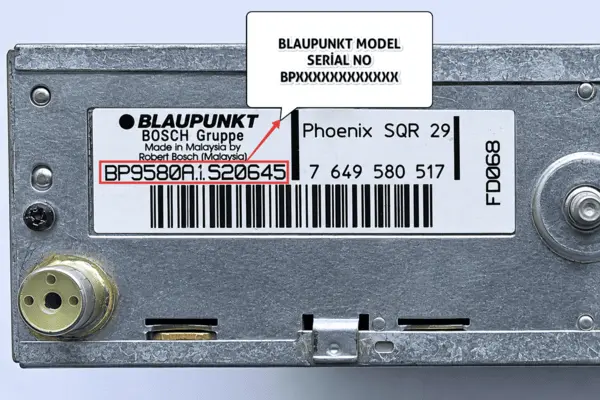
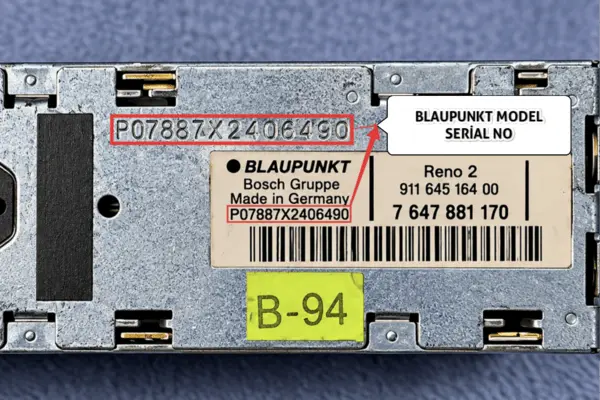
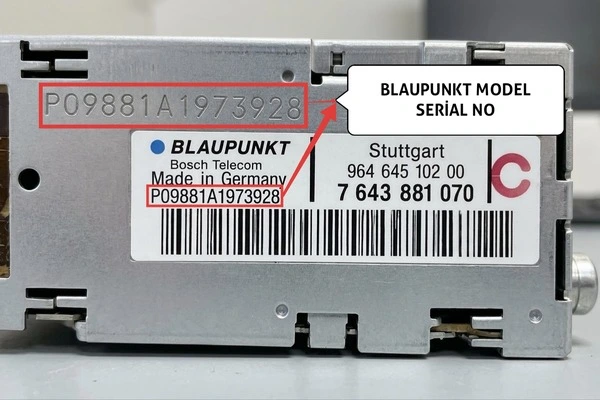
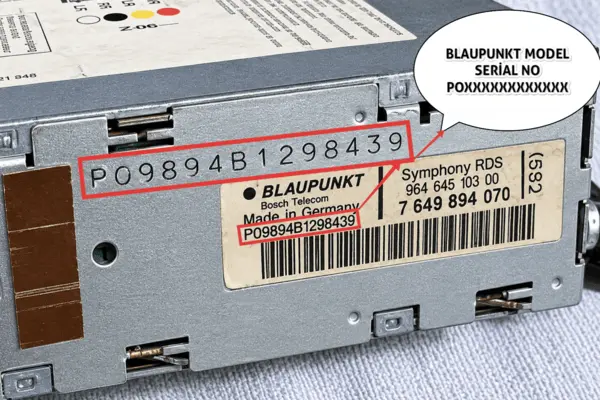
- Written on a Single Line: On Blaupunkt radios, the serial number is written as a single line on the left side of the label, above the barcode. It is also stamped on the metal body of the device. You do not need to combine two fields as with Becker.
- It Is 14 Characters Long: The serial number starts with BP or P0, followed by 4 digits, 1 letter and 7 digits. It is 14 characters in total.
- Be Careful When Typing P0: On some Porsche Blaupunkt radios, the serial number starts with P and zero (P0). The letter O and the digit zero can be confused; our lookup tool accepts both P0 and PO spellings.
- Example: If the label says P09894B1298439 or BP9580A1520645, you must enter it into the lookup field as it is, without any spaces.
After you find your number, you can get your code by using our online tool at the bottom of the page.
Supported Porsche Radio Models
Our lookup tool supports the following radios used in Porsche vehicles:
- ✅ 14-Character Becker Series (CDR 21, CDR 22 and similar models)
- ✅ Blaupunkt Phoenix SQR 29 (BP9580…)
- ✅ Blaupunkt Reno 2 (P07881…)
- ✅ Blaupunkt Stuttgart (P09881…)
- ✅ Blaupunkt Symphony RDS (P09894…)
For Becker models, the Porsche 911, Boxster, Cayenne, Cayman, Panamera and other Porsche models are supported. Blaupunkt models were mostly used in Porsche vehicles of the ’80s and ’90s (911, 928, 944, 964, 968).
Porsche Serial Number Examples (Visual Guide)
You can use the images below as a reference to see how to build the serial number from the label on your radio.
Examples for Becker Models: (Combine the Model No and Serial No. fields to create the 14-character serial number.)
Examples for Blaupunkt Models: (Enter the single-line 14-character serial number on the label exactly as it is.)
⚠️ Attention: Some Label Formats Are Not Supported
As in the image below, if you see the “Typ: PCM” notation on your label together with a code such as Model-No.: BE 2560, BE 2580, BE 2582, please note the following:
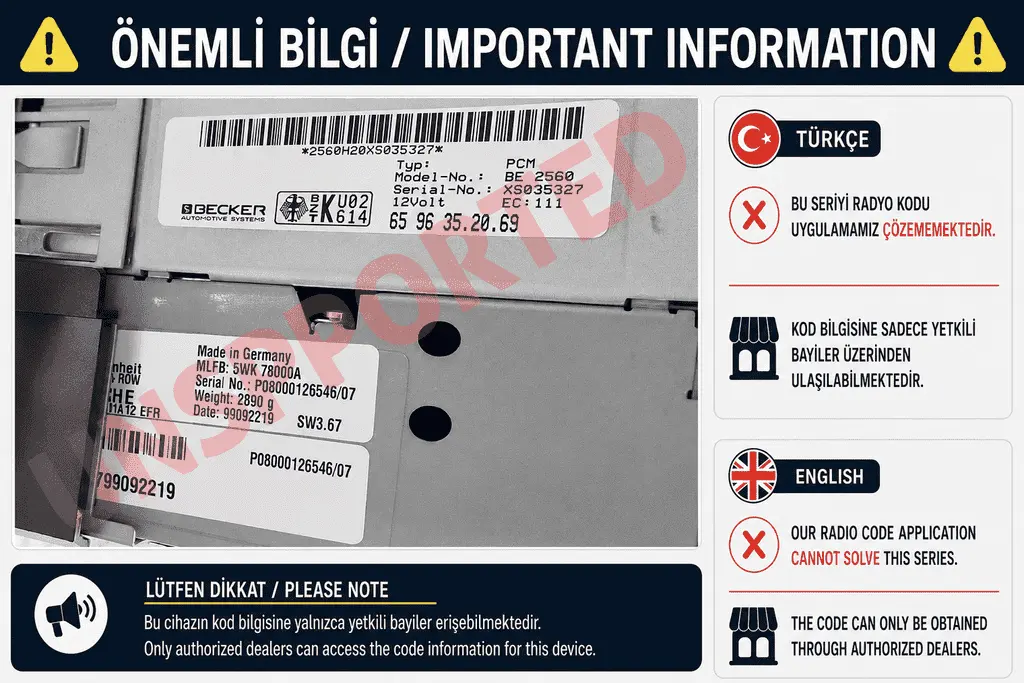
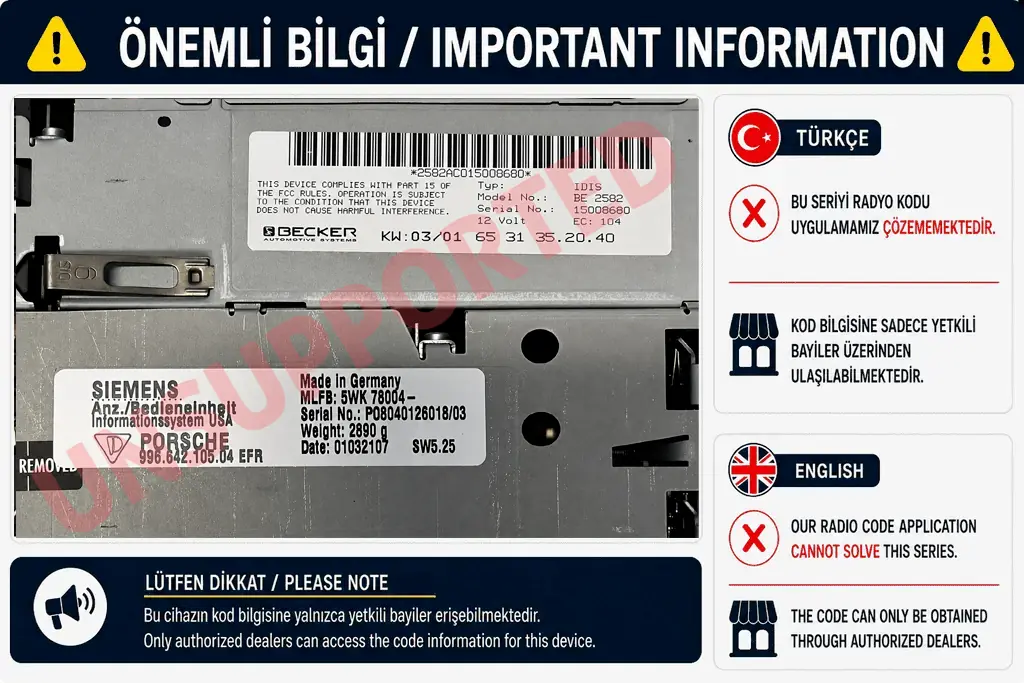
Model numbers in this format (BE 2560, BE 2580, BE 2582 / PCM type) are not supported by our system. Your label may also contain a second serial number in the MLFB and P08000… format; this number is also not compatible with our online lookup tool.