Nissan Stereo Radio Code Finder
Nissan Radio Code Finder: Fast and Secure Lookup
 |
 |
How to Find Your Nissan Radio Code?
Your vehicle’s radio unit may go into protection mode due to battery removal, power outage, or disconnection, and you might see the “CODE” message on the screen. This means the radio unit will not work without entering the security code. A serial number is required to find out the code. The most common method to determine the serial number is to remove the radio unit and read the label on it.
Radio units used in Nissan vehicles vary by brand and model: Blaupunkt, Renault, Visteon, and Becker series radios are frequently encountered models in these vehicles. To understand which series you have, please carefully examine the visuals and descriptions in the following sections.
1) BLAUPUNKT SERIES SERIAL NUMBERS (BP… FORMAT)
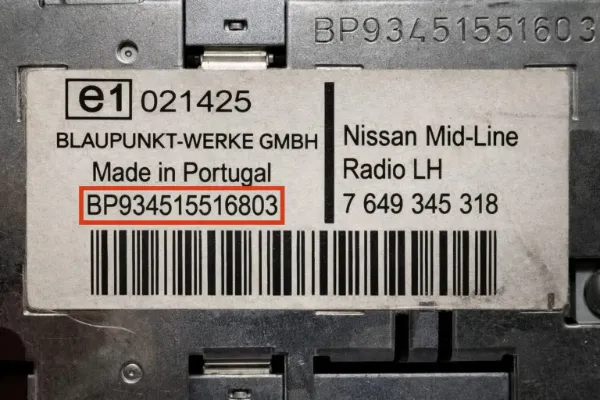
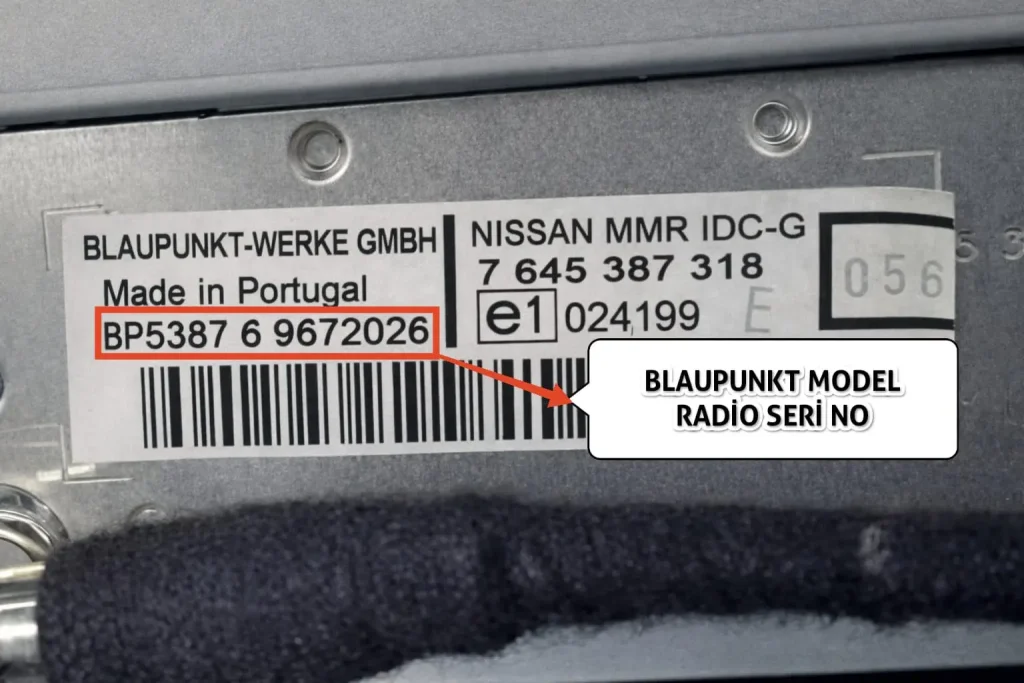
📘 The serial numbers for Blaupunkt model radio units used in Nissan vehicles are indicated in the visuals above.
⚙️ When inquiring, it must be entered into the lookup tool starting with BP and consisting of a total of 14 characters.
🔢 Example serial numbers:
BP53876 9672026
BP934515516803
💡 On some labels, the serial number may be written as 17 characters like 815BP… or 815CM…. In this case, skip the leading 815 prefix and enter the remaining 14 characters (replacing CM with BP if present) into the lookup tool.
👇 If you have found your serial number, click to look up:
Go to Calculator Tool 🚀
2) RENAULT SERIES SERIAL NUMBERS (J295, U769, J727 FORMAT)
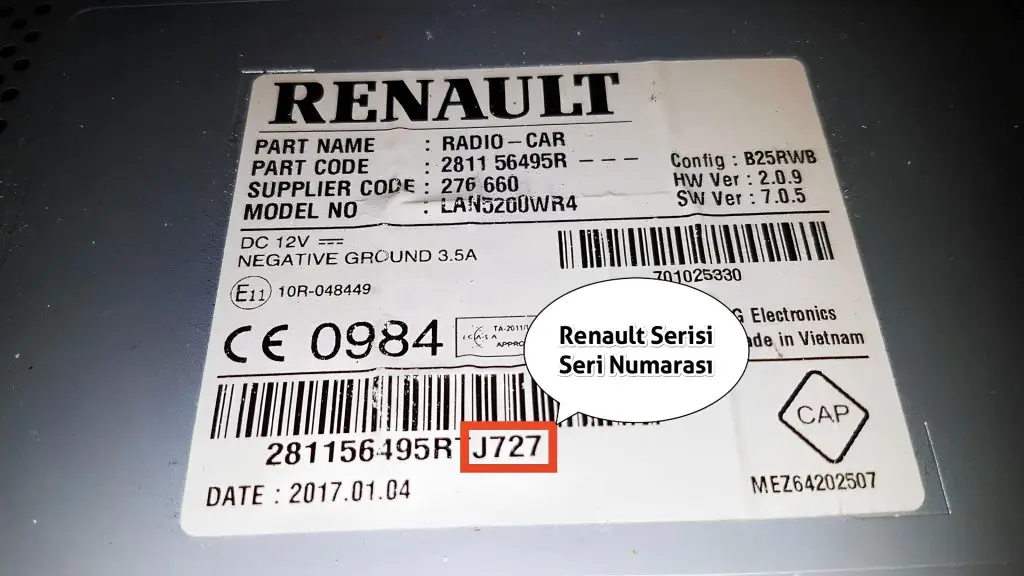
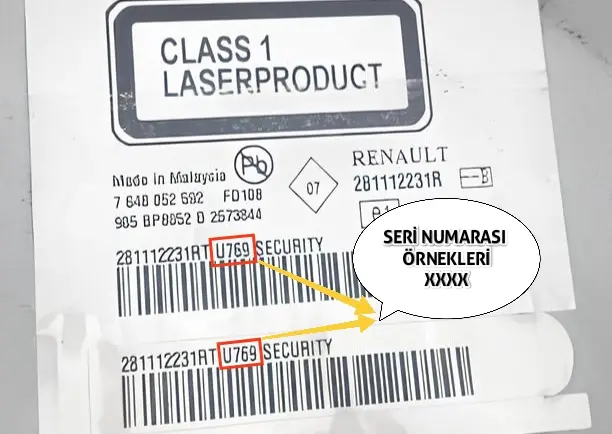
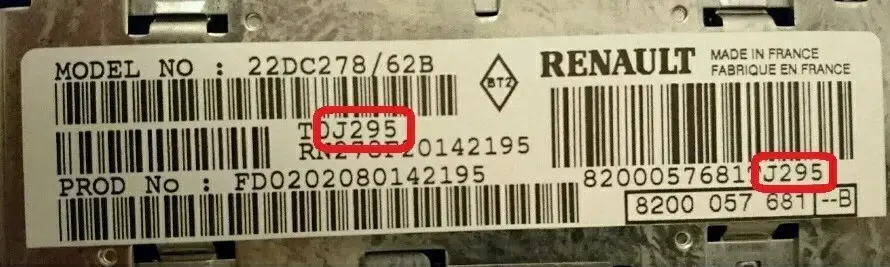
📘 The serial numbers for Renault model radio units used in Nissan vehicles are indicated in the visuals above.
⚙️ When inquiring, it must be entered into the lookup tool as a combination of 1 letter and 3 numbers, totaling 4 characters.
🔍 On some labels, the serial number may be written in small letters right next to or below a long barcode. Focus on the 4-character code (e.g., J727, J295, U769) next to the barcode.
🔢 Example serial numbers:
J727
J295
U769
A123
👇 If you have found your serial number, click to look up:
Go to Calculator Tool 🚀
3) BECKER MODEL SERIES SERIAL NUMBERS
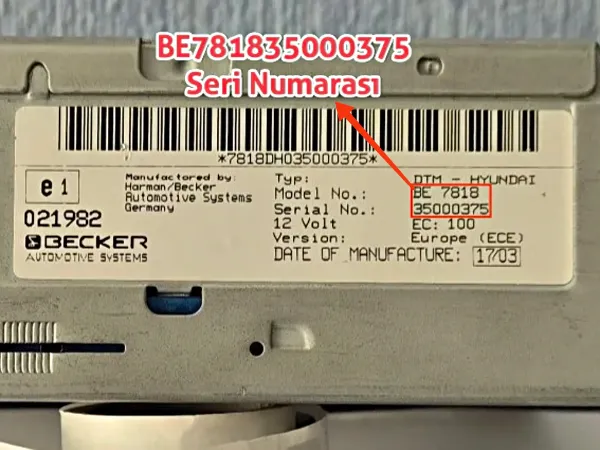
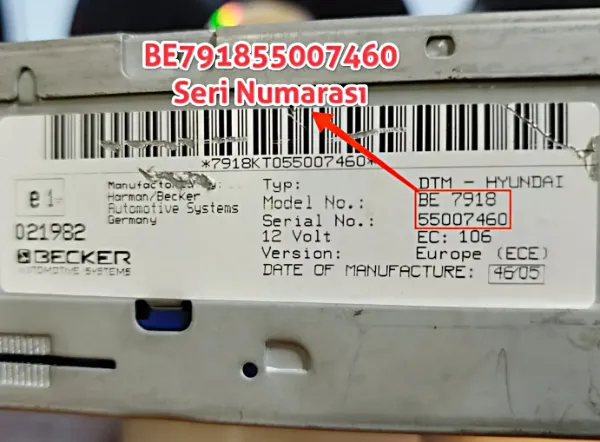
📘 The serial numbers for Becker (Harman/Becker) model radio units used in Nissan vehicles are indicated in the visuals above.
⚙️ When inquiring, it must be entered into the lookup tool starting with BE and consisting of a total of 14 characters. It is created by combining the Model No and Serial No.
🔍 You can obtain the full serial number by combining the Model No (e.g., BE 7818) and Serial No (e.g., 35000375) information on the label side by side.
🔢 Supported Becker models and example serial numbers:
BE781835000375
BE791855007460
⚠️ Important Note: Only Becker radios with model numbers BE4739 and BE4757 are supported in Nissan vehicles. Becker devices with different model numbers are out of the scope of inquiry for this vehicle.
👇 If you have found your serial number, click to look up:
Go to Calculator Tool 🚀
4) VISTEON SERIES SERIAL NUMBERS (M123456 FORMAT)
📘 The serial number for Visteon model radio units used in Nissan vehicles consists of a 7-digit code starting with the letter M on the label.
⚙️ When inquiring, it must be entered into the lookup tool starting with the letter M followed by 6 digits, totaling 7 characters.
🔢 Example serial numbers:
M123456
M987654
👇 If you have found your serial number, click to look up:
Go to Calculator Tool 🚀
- Code entry is generally done using station buttons numbered 1–4.
- For example, if your code is 4782: press the “1” button until 4 appears, “2” button until 7, “3” button until 8, and “4” button until 2 appears; for the Blaupunkt series, then complete the process by pressing and holding the “6”, “TA”, or “SEEK” button for 10–15 seconds.
Radio Code Finder Tool for Nissan Blaupunkt / Renault / Becker / Visteon Series
Frequently Asked Questions (FAQ) About Nissan Radio Codes
- Blaupunkt series: After the four digits appear correctly, press and hold the preset button number “6”, the “TA” button, or the “SEEK” (▲) button for 10–15 seconds.
- Renault and Visteon series: Press the “OK” or “ENTER” button.
Since the confirmation button varies by model, we also recommend reviewing your vehicle’s user manual.
- Incorrect Serial Number: This is the most common situation. You may have confused the letter “O” with the number “0”, the letter “I” with the number “1”, or entered a character missing in the serial number. Carefully check the label again.
- Changed Radio: The radio may have been replaced when the vehicle was with the previous owner. If the vehicle does not have the original factory radio, the calculated code will also be different.
- EEPROM Interference: In very rare cases, the radio’s internal memory (EEPROM) may have been previously changed or reprogrammed at a professional service. In this case, the process cannot be done with a button combination; hardware intervention is mandatory.
Please check your serial number again and try again in our online radio code lookup tool.