Honda Radio Code Finder | Gathers VXM & Blaupunkt Unlock Service
Honda & Gathers & Blaupunkt Radio Code Retrieval (All Models)
 |
 |
 |
 |
Hello Dear Honda Owners,
Did your radio lock after a battery change on your Honda? If you see “CODE” or “ENTER CODE” on the screen, you’re in the right place. As Turkey’s most comprehensive Honda radio code service, we provide 100% original code support — from locally-produced Civics to Japan-imported Gathers navigation units, from European Blaupunkt systems to classic Accord models. ⬇️ Enter your serial number below to look up your code now.
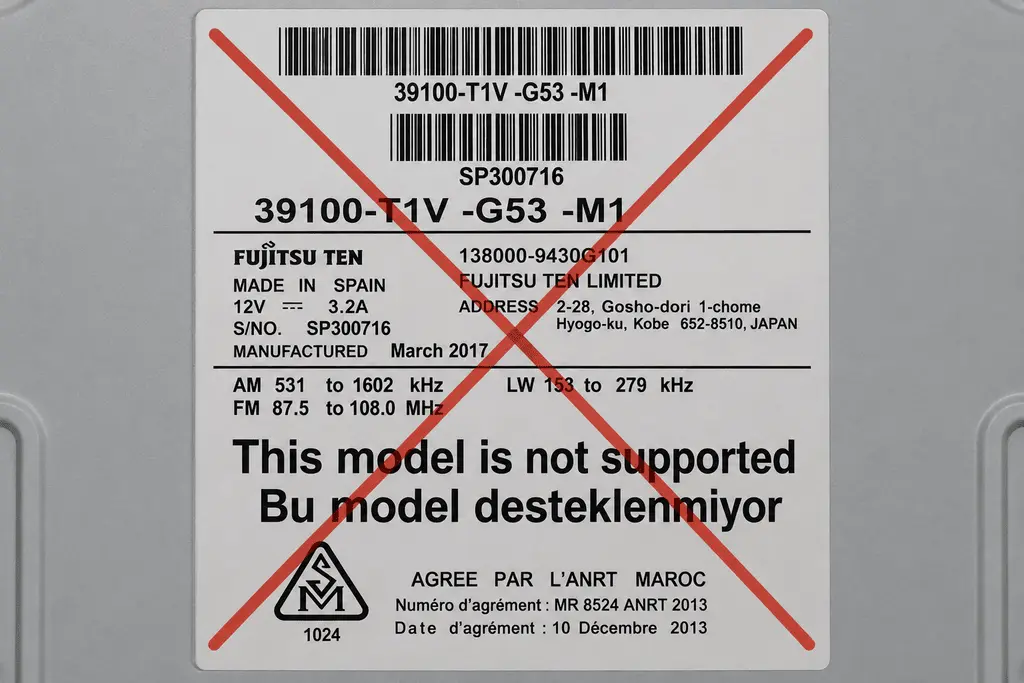
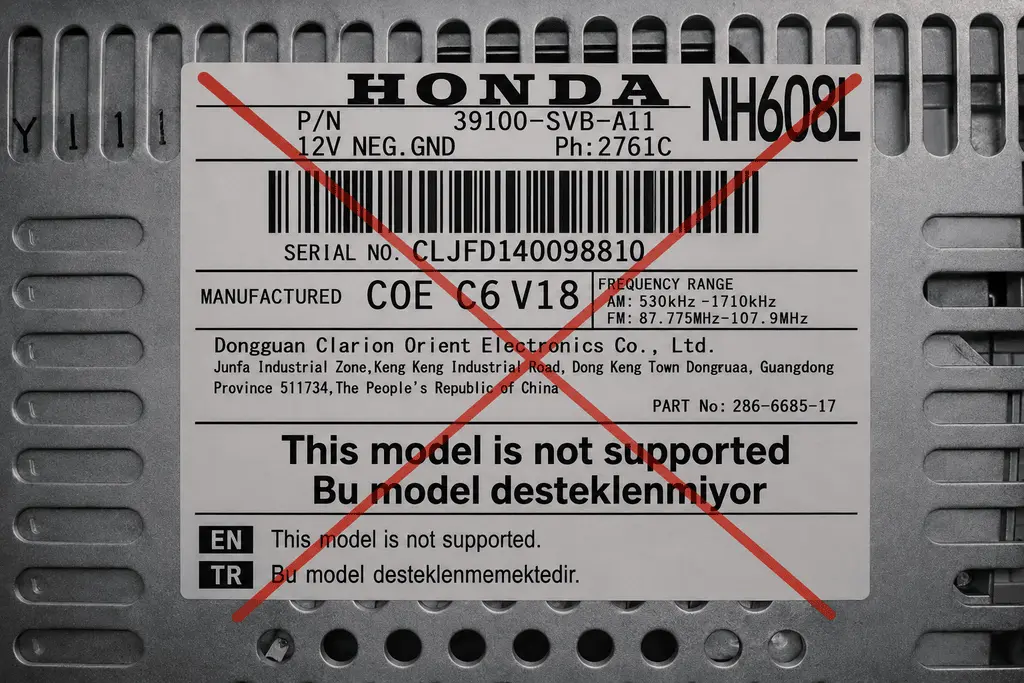
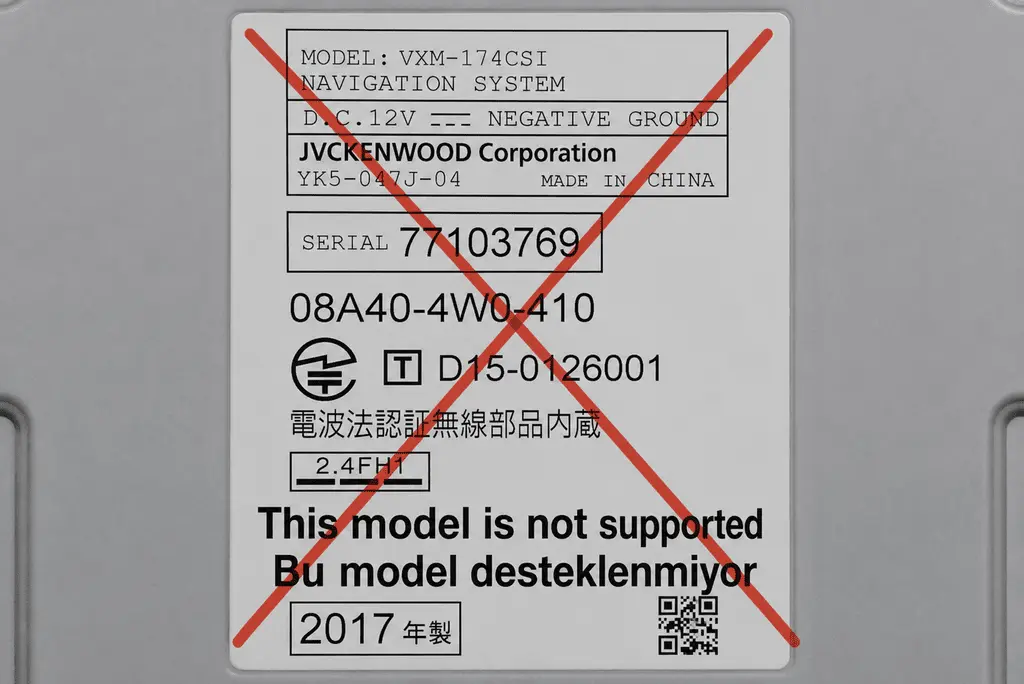
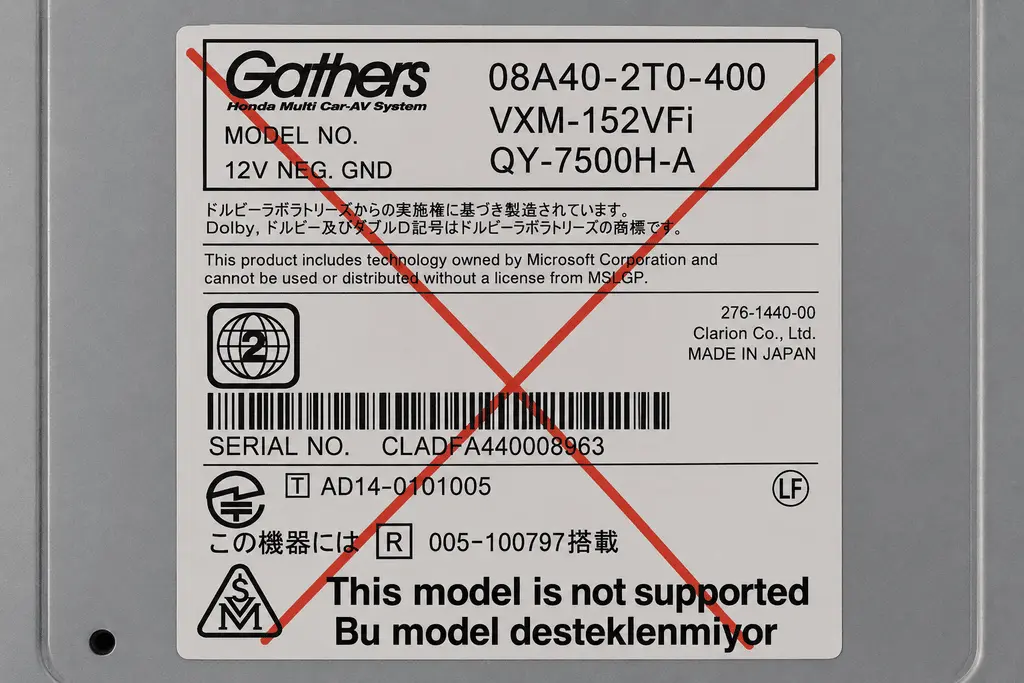
💡 ⚠️ Important Note: Our system only supports original Honda, Gathers, Blaupunkt, Pioneer, Panasonic/Matsushita, and Mitsubishi Electric units. Codes for Fujitsu, Clarion, and JVCKENWOOD branded units cannot be generated by us; for these brands, code retrieval is only available through an authorized Honda service center. If you’re not sure which brand your unit is, you can check the example label images at the bottom of the page.
How to Read the Radio Serial Number?
Method 1: 2001 and Later Models (Via the Display)
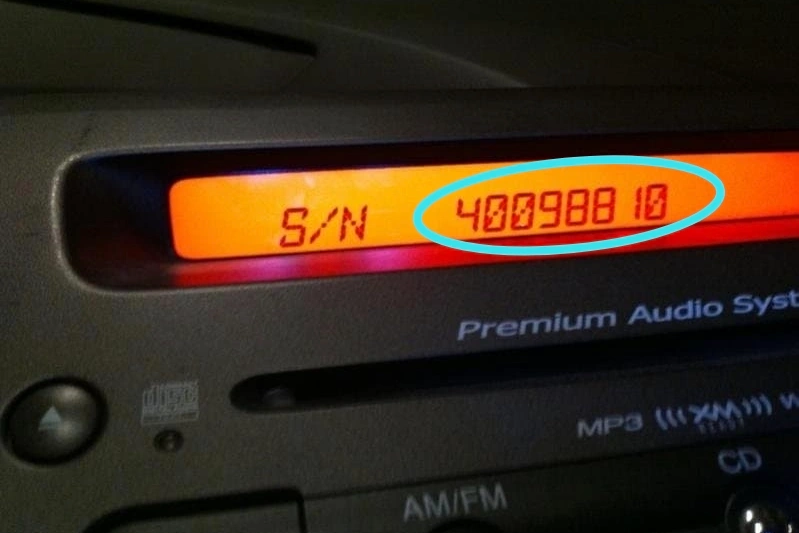
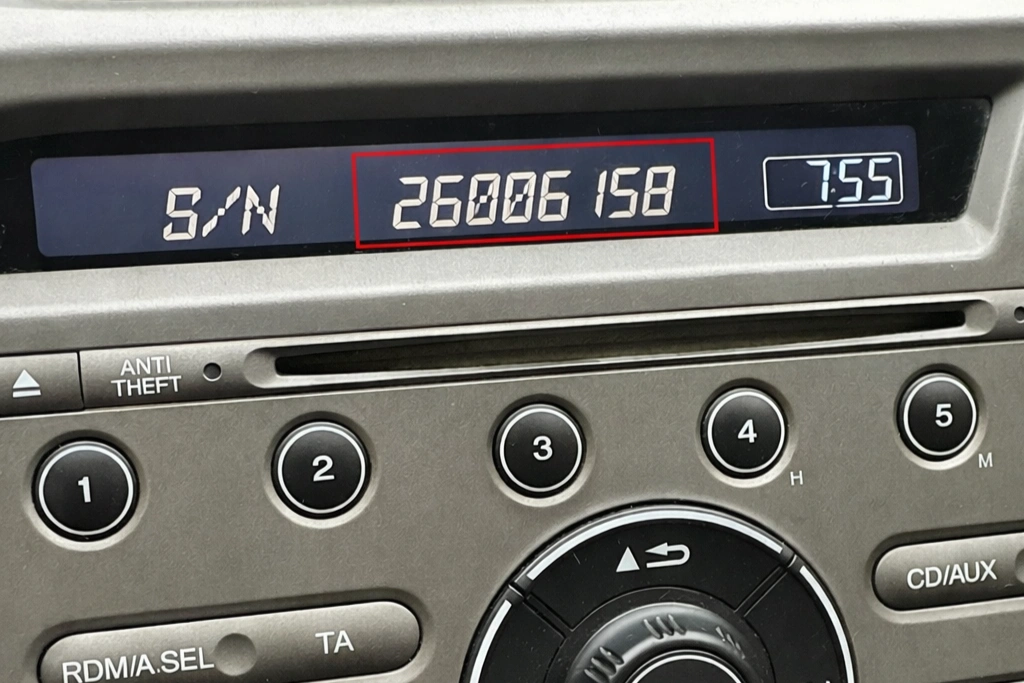
If you’re driving a Honda newer than 2001, you can usually see the serial number without removing the unit:
- Step 1: Turn the ignition to the ON position.
- Step 2: Turn on the radio and see the “CODE” message on the display. (If it doesn’t appear, remove the radio fuse for 1 minute, reinsert it, and return to Step 1.)
- Step 3: Turn off the unit.
- Step 4: Hold down the 1 and 6 buttons on the radio panel while turning it on.
- Step 5: The display will alternate between U (showing the first 4 digits of the serial number, e.g. U2200) and L (showing the last 4 digits, e.g. L0055).
- Step 6: Write down the number exactly as shown and enter it into the lookup tool. The system will recognize it automatically.
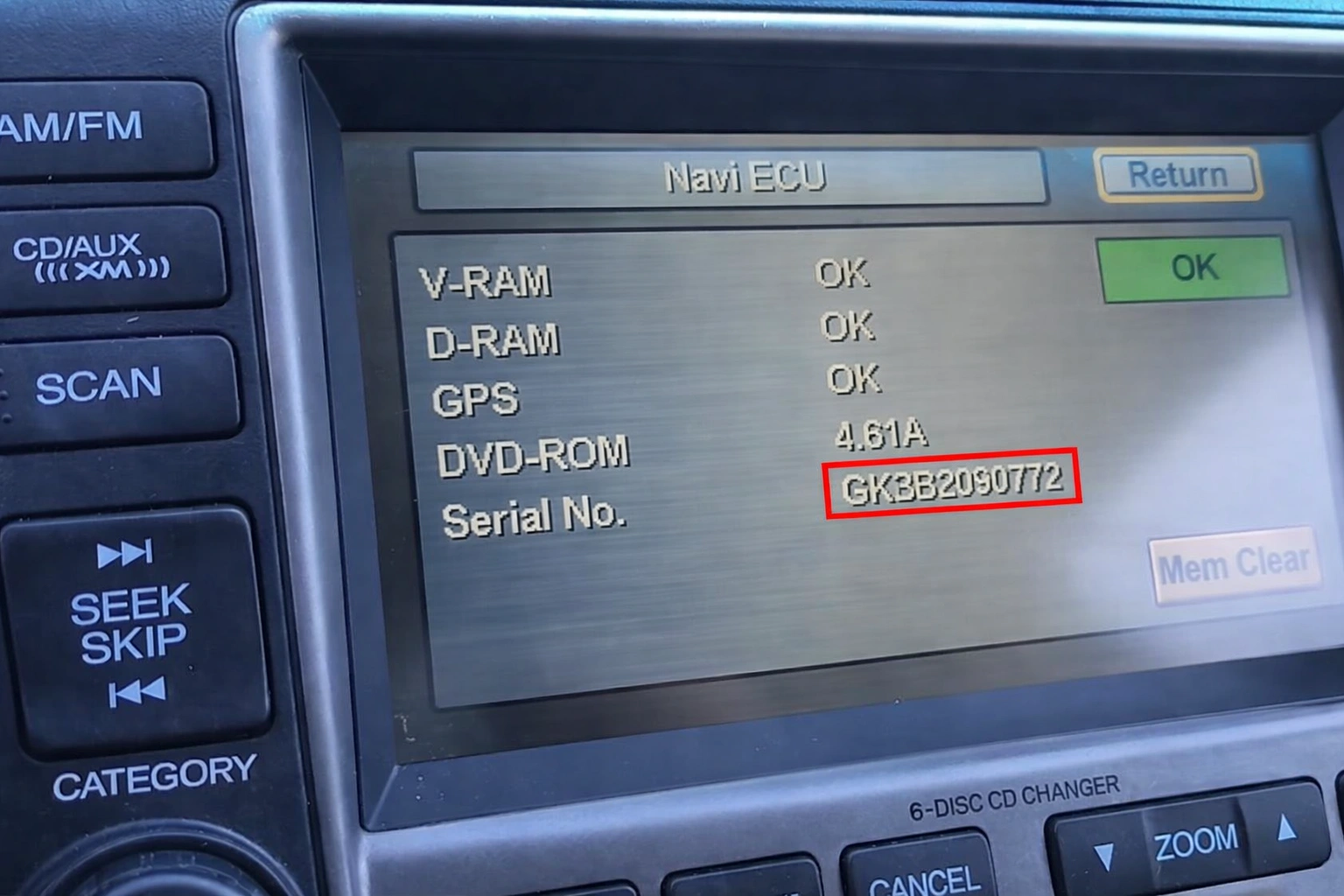
💡 Alternative Format: On some units, the serial number may appear all at once, like 40047239 or AHH27001589.
Method 2: Honda Accord (2003–2007 Special Method)
- Step 1: Turn the ignition to the ACC (I) position.
- Step 2: Turn on the radio and see the “CODE” message on the display. (If it doesn’t appear, remove the radio fuse for 1 minute, reinsert it, and return to Step 1.)
- Step 3: Turn off the unit.
- Step 4: Hold down the upper halves of the SEEK/SKIP and CH/DISC buttons, then press and release the PWR/VOL knob while still holding them.
- Step 5: The display will alternate between U (showing the first 4 digits of the serial number, e.g. U2200) and L (showing the last 4 digits, e.g. L0055).
- Step 6: Write down the number exactly as shown and enter it into the lookup tool below. The system will recognize it automatically.
Method 3: Pre-2001 Models or Non-Working Displays (Label)
If your car is older than 2001, or the display doesn’t show a serial number, you’ll need to remove the unit:
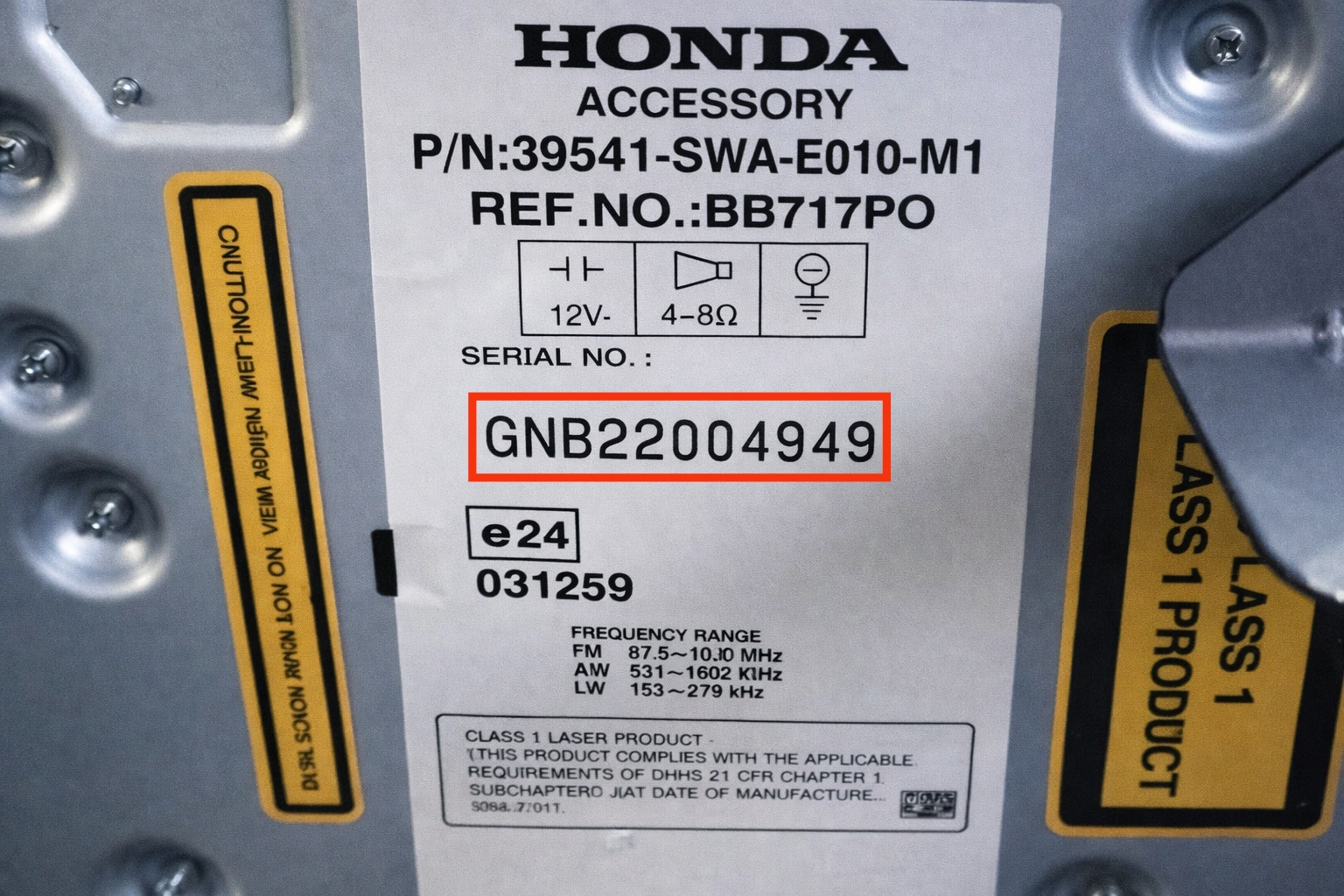
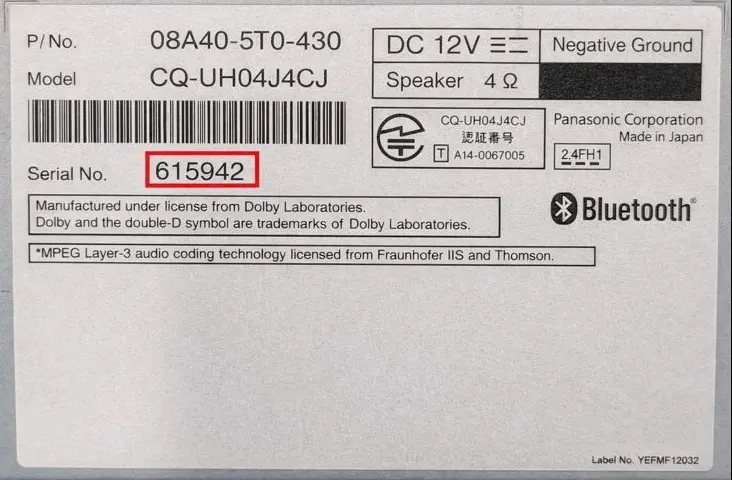
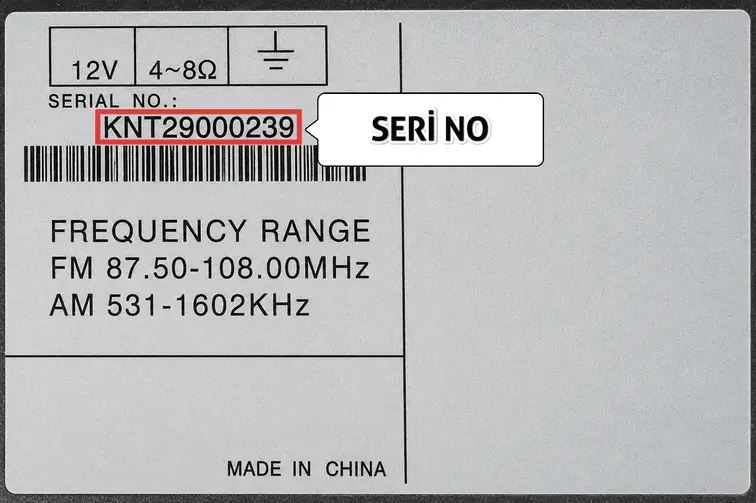
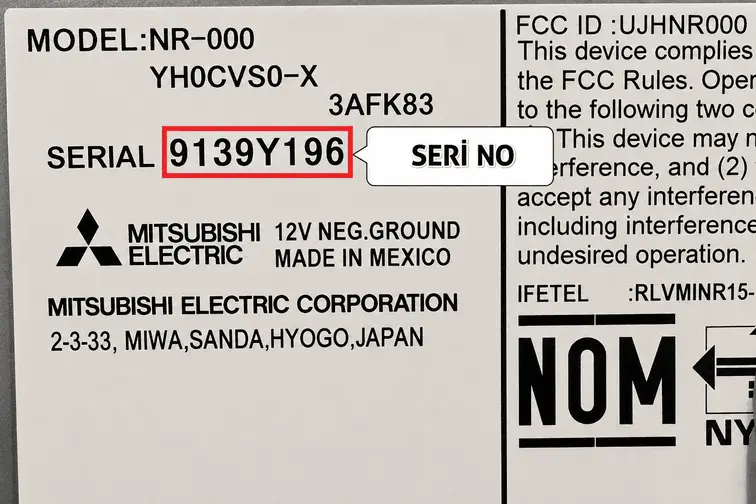
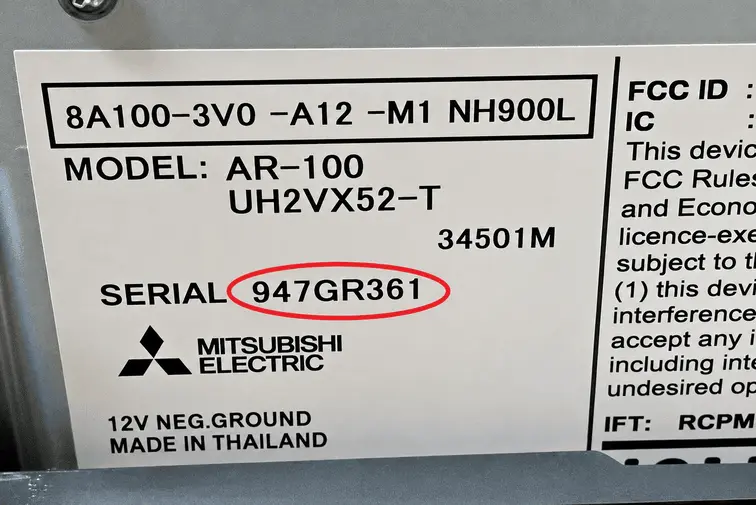
- Find the section labeled “Serial No” on the side or top of the unit.
- Example: Write down numbers exactly as shown, e.g. HLB22033893B, GGZ22019674, 30009030, BP5022S0692058, KNT29000239, 9139Y196, 987B7421, 947GR361.
- Once you have the number, use the online lookup tool below.
Method 4: Navigation (Navicode) Serial Number
Your navigation unit’s serial number is located in a different place than the radio unit:
- The number is found on the navigation unit in the trunk or on the label of the control panel where the removable DVD is located.
- It’s usually 8 digits (e.g. 12345678), sometimes with 3 letters at the beginning (e.g. ABC12345678).
- If you have a navigation serial number, the navicode can also be looked up through the same query.
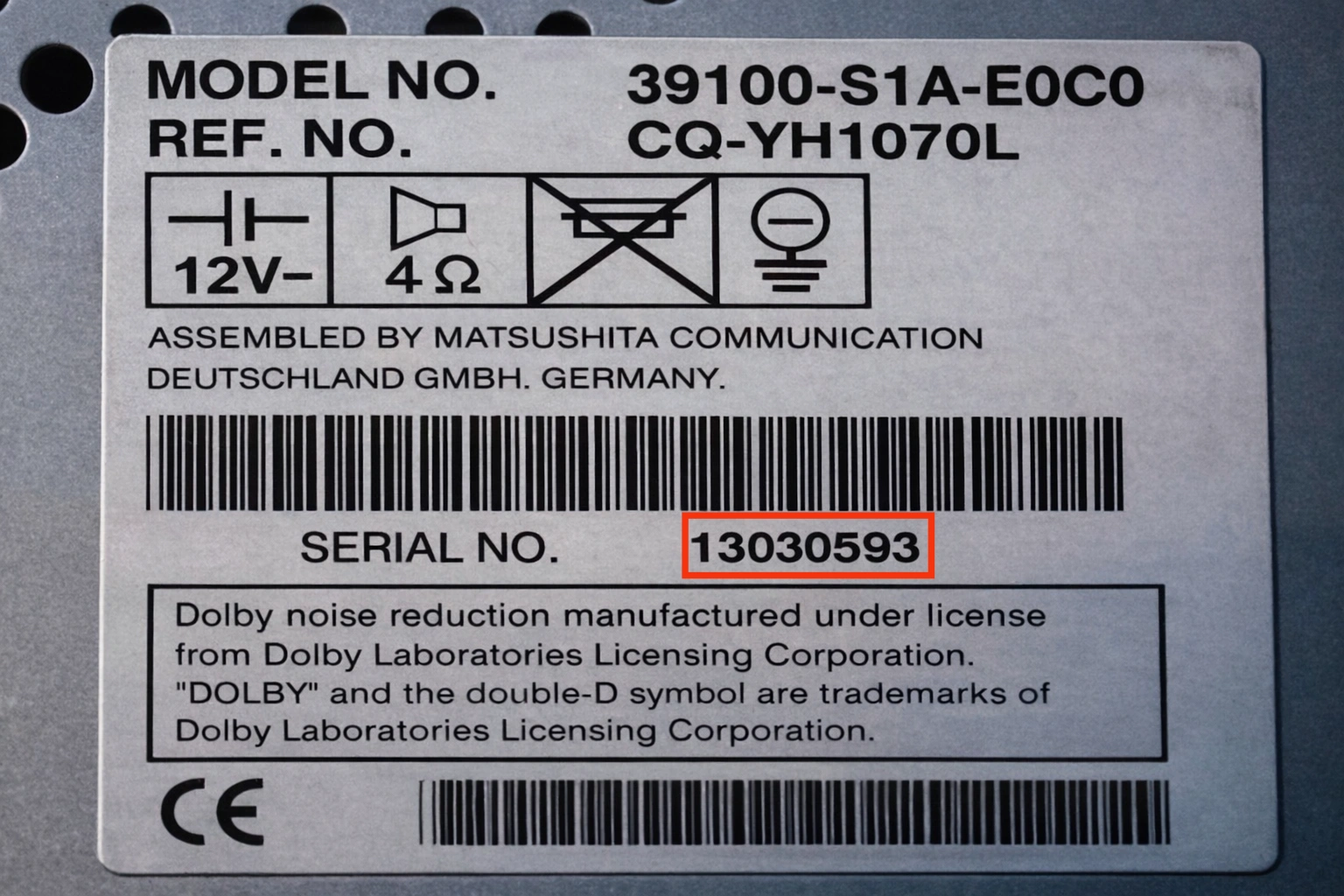
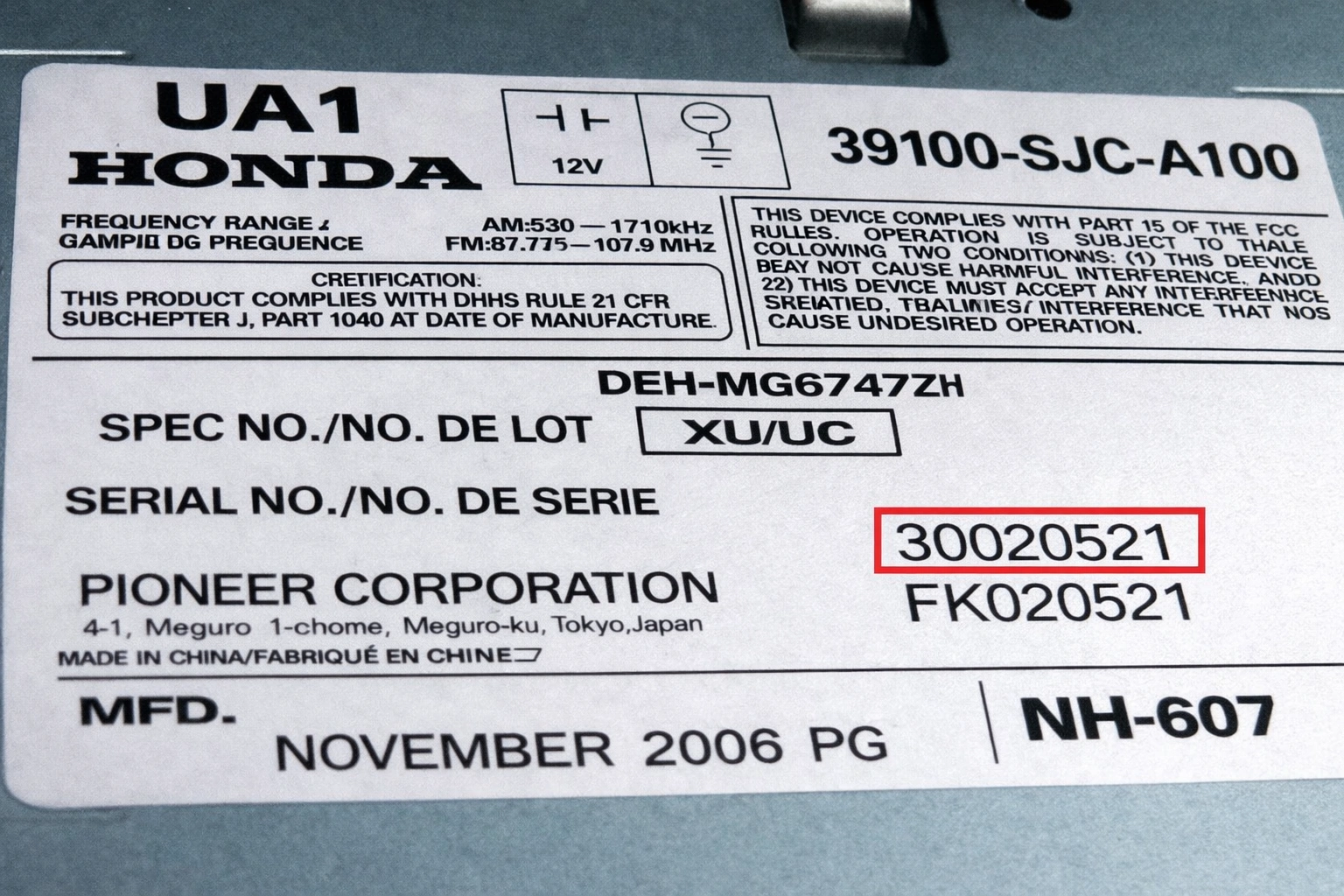
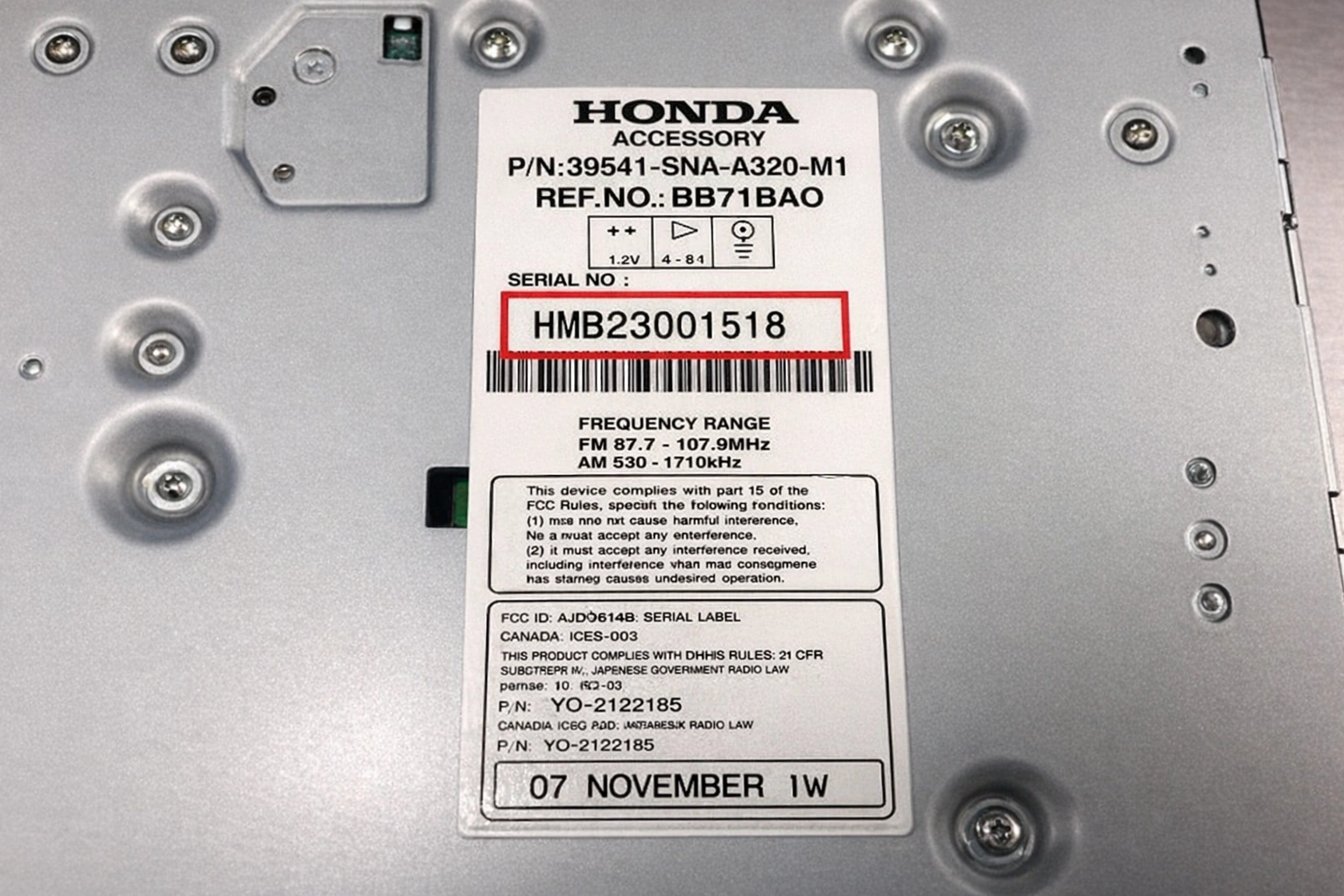
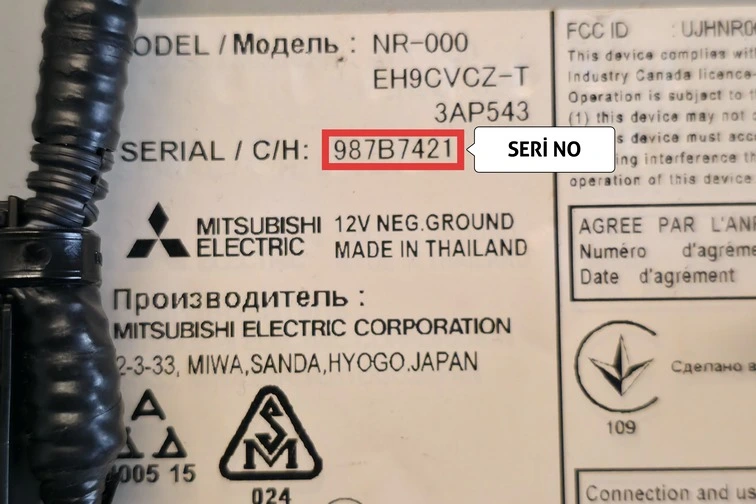
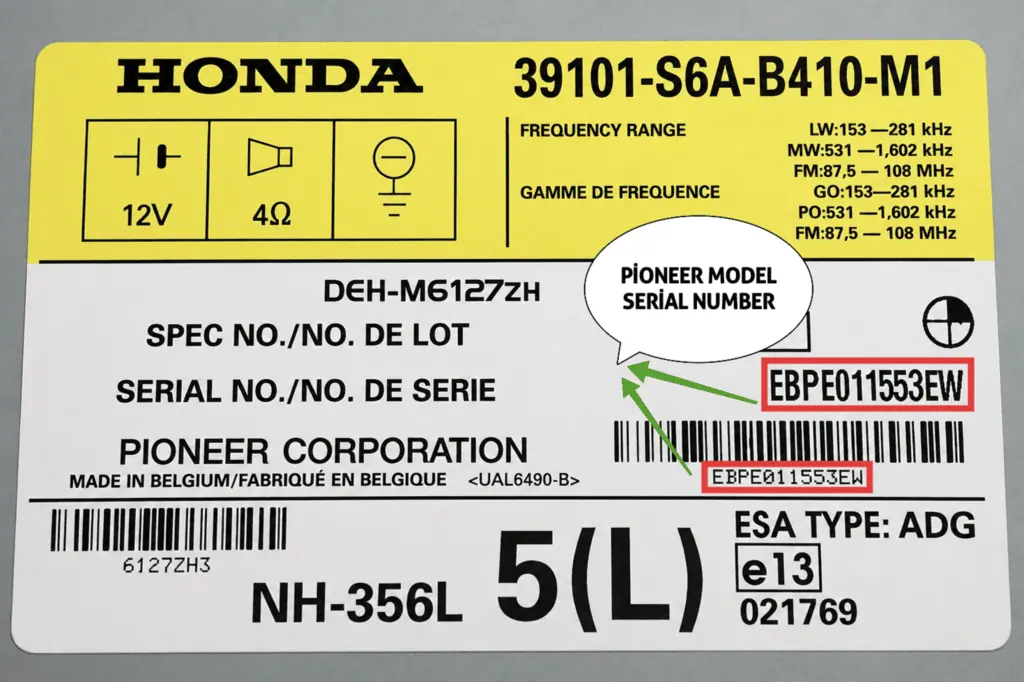
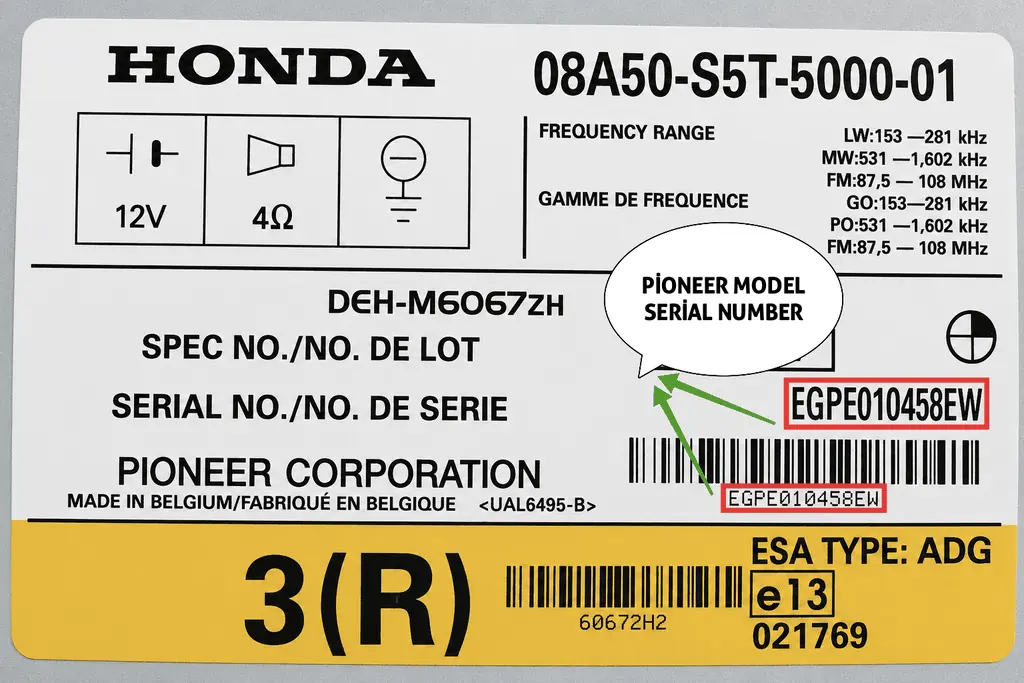
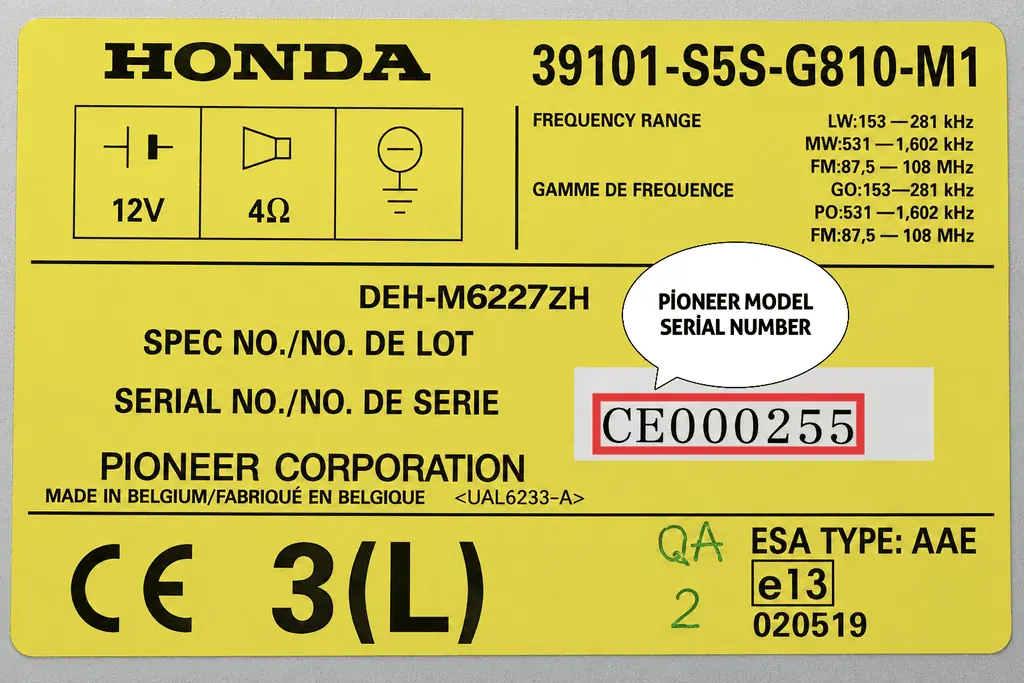
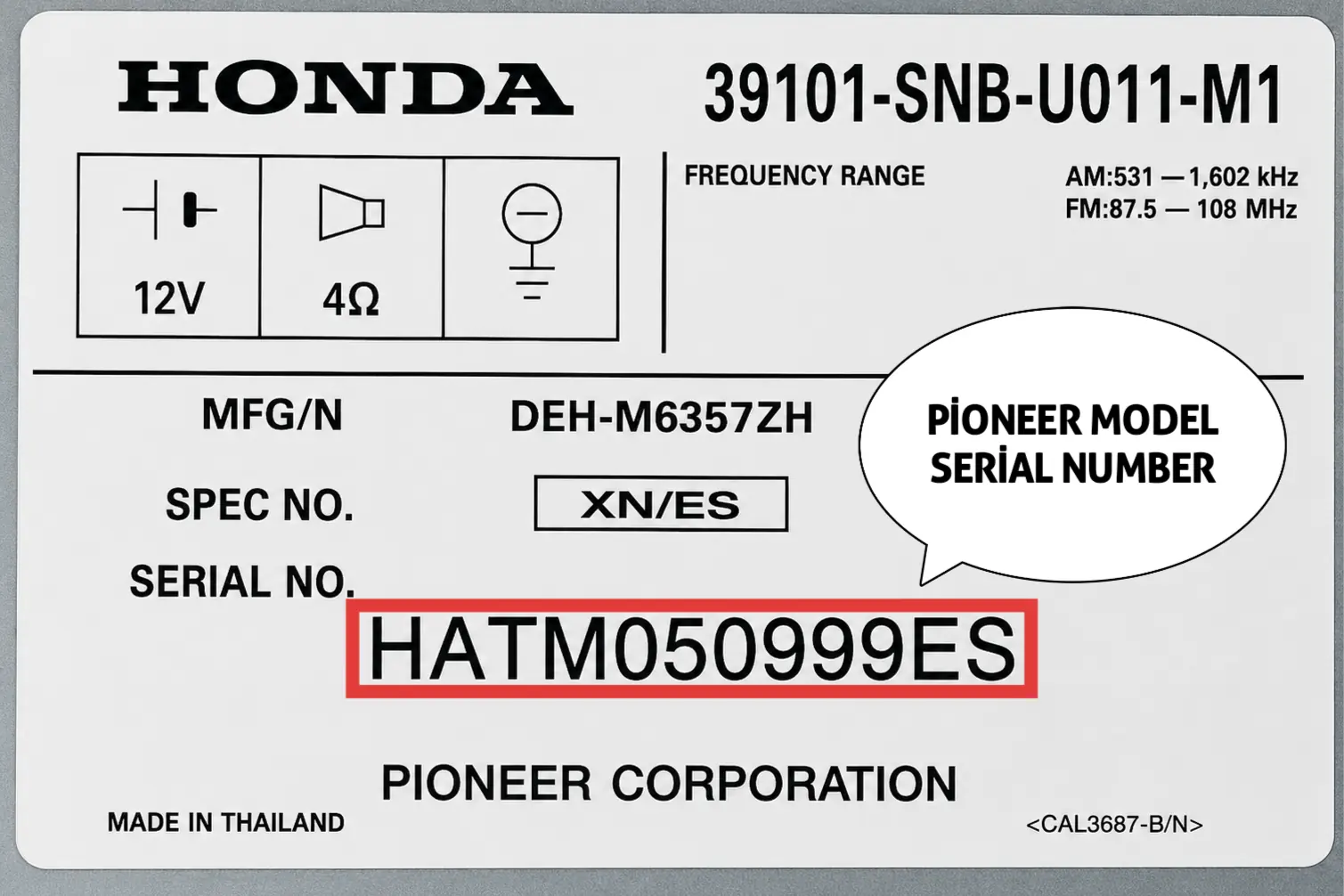
FOUND YOUR NUMBER? USE THE LOOKUP TOOL BELOW ⬇️
✅ Supported Honda Gathers (VXM) Models
| Gathers Model | Compatible Vehicles |
|---|---|
| VXM-128 VSX / VXM-135 VFNi | HONDA FIT, FREED, STEPWGN, GRACE |
| VXM-145 VFi / VSi / C / VFNi | VEZEL, FIT HYBRID, FIT SHUTTLE, NWGN |
| VXM-152 / VXM-155 VSi | FREED, VEZEL, NWGN |
| VXM-164 / VXM-165 VFi | STEPWGN SPADA, JADE |
| VXM-184 / VXM-185 VFNi | STEPWGN RP, FIT RS |
| VXM-187 / VXM-194 / VXM-197 VFi | VEZEL, FIT, N-BOX, N-WGN |
| VXM-204 / VXM-207 VFNi | FIT GK, SHUTTLE GG, FREED GB |
| VXM-214 / VXM-217 VFi | STEPWGN RP3/RP4, JADE FR5 |
| VXM-224 / VXM-227 VSi | VEZEL RU1/RU2, HR-V, N-BOX JF3/JF4 |
| VXM-237 / VXM-247 VFNi | FIT GR, FREED GB5/GB6, NWGN JH3 |
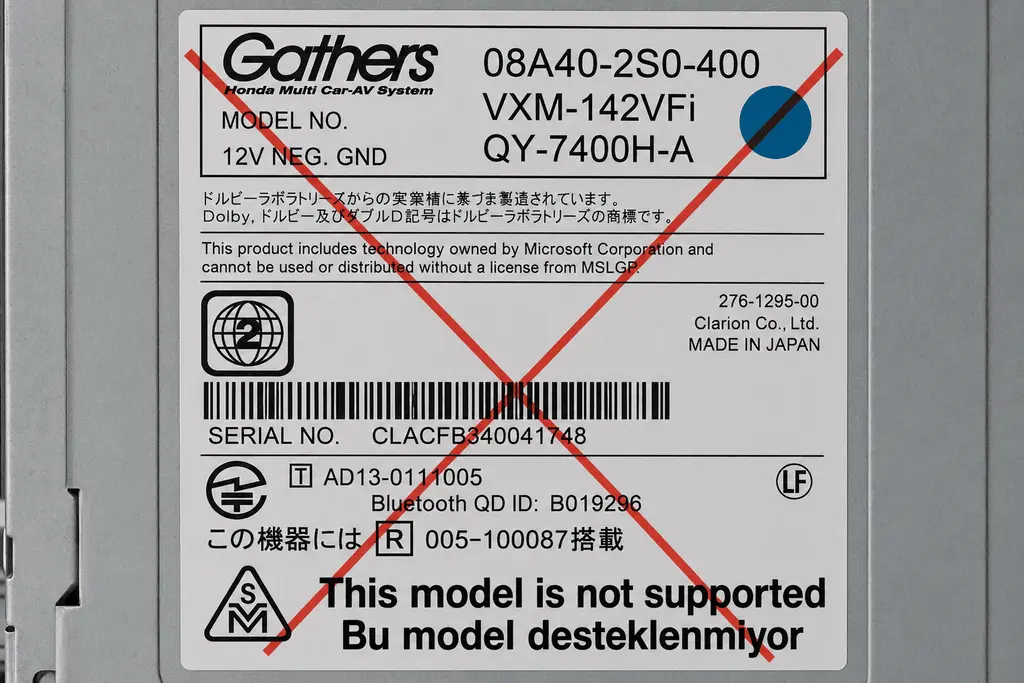
⚠️ Note: The VXM model numbers above are only valid for genuine Gathers units, where the manufacturer line reads “Gathers / Honda Multi Car-AV System.” If your label shows “Clarion Co., Ltd.” or “JVCKENWOOD Corporation” next to or below the model name — this is the case for certain units of VXM-142VFi, VXM-152VFi, and VXM-174CSi, among others — that unit is not supported by us. For these, you’ll need to contact an authorized Honda service center. See the example labels at the bottom of the page.
✅ Supported Honda Panasonic / Sanyo / Matsushita Models
| Serial No. Format | Compatible Models |
|---|---|
| 6-digit numeric (e.g. 615942) | Honda Jazz, CR-V, Civic (Panasonic/Matsushita) |
| 8-digit numeric (e.g. 40047239) | Honda Accord, Civic, CR-V, Jazz (2000–2015) |
| 12-digit numeric | Honda Pilot, Odyssey, Ridgeline (2003–2012) |
| Letters+Numbers (e.g. AHH27001589) | Honda Accord, CR-V, Element (2006–2011) |
| U…L… format (e.g. U10201L0001) | Honda Civic, Jazz, HR-V (2001–2015) |
| HBB / GGZ / HLB / GNB / HMB series | Honda Accord Euro, CR-V (2008–2014) |
✅ Supported Honda Pioneer Models
| Serial No. Format | Compatible Models |
|---|---|
| 8-digit numeric (e.g. 30020521) | Honda Accord, Civic, CR-V, Pilot (Pioneer-manufactured) |
| CLJ… / FK… series | Honda Civic, CR-V (Clarion/Pioneer) |
✅ Supported Honda Mitsubishi Electric Models
| Serial No. Format | Compatible Models |
|---|---|
| 8-digit Letters+Numbers (e.g. 9139Y196) | Honda Jazz, Civic, CR-V (Mitsubishi Electric-manufactured) |
| KNT… series (e.g. KNT29000239) | Honda Jazz / Fit (Mitsubishi Electric, Made in China) |
| 7-digit mixed (e.g. 987B7421, 947GR361) | Honda Accord, CR-V (Mitsubishi Electric, Made in Thailand) |
⚠️ Note: Mitsubishi Electric-manufactured units display SERIAL or SERIAL / C/H on the label. Enter this number exactly as shown into the lookup tool.
✅ Supported Honda Blaupunkt Models
| Model Name / Serial No. | Part Number (Ref No.) |
|---|---|
| BP1491 TRAVELPILOT RNS | 7 612 001 495 |
| BP2001 / BP2002 / BP2003 (SN7 A-B-C) | 7 642 001/2/3 390 |
| BP2020 / BP2022 / BP2023 (ACCESS A-B-C) | 7 642 020/2/3 390 |
| BP2030 / BP2032 / BP2033 (CONCERTO) | 7 642 030/2/3 390 |
| BP5020 / BP5022 / BP5024 (100R-150R-200R) | 7 645 020/2/4 590 |
🚗 Honda Vehicle Models We Support
| Vehicle Model | Support Status |
|---|---|
| Honda Accord (All Years) | ✅ Radio + Navigation Code |
| Honda Civic (2007, 2008, Other) | ✅ Radio + Navigation Code |
| Honda CR-V (SUV Models) | ✅ Radio + Navigation Code |
| Honda Pilot | ✅ Radio + Navigation Code |
| Honda Odyssey | ✅ Radio + Navigation Code |
| Honda Jazz / Fit | ✅ Radio + Gathers VXM Code |
| Honda Freed / Vezel | ✅ Gathers Navigation Code |
| Honda Stepwgn | ✅ Gathers VXM Code |
| Honda N-Box / N-WGN | ✅ Kei-Car Radio Code |
| Honda HR-V / Vezel | ✅ Radio + Gathers Code |
| Honda Stream / Airwave | ✅ Radio Code Support |
| Honda Integra / Legend | ✅ Radio Code Support |
| Honda Element / Crossroad | ✅ Radio Code Support |
| Honda Ridgeline | ✅ Radio Code Support |
| Acura (All Models) | ✅ Radio Code Support |
📞 Note: For Honda models from the supported brands listed above that aren’t shown in the table, you can reach us via WhatsApp or Telegram. Fujitsu, Clarion, and JVCKENWOOD branded units are outside this scope; for these brands there’s no need to contact us — please reach out directly to an authorized Honda service center.
🔍 Online Honda Radio Code Lookup
Enter your serial number below and get your code instantly.
ℹ️ Examples of Unsupported Brand Labels
If your label shows one of the manufacturer names below (Fujitsu Ten, Clarion, JVCKENWOOD), we are unable to generate a code for that unit. These images are for comparison purposes only — for these units, please contact an authorized Honda service center directly.
Frequently Asked Questions (FAQ)
Q: Do I need to pay separately for a navigation code?
A: Navigation code lookups are handled through the same system as radio code lookups.
Q: I can’t see the serial number on the display, why?
A: Your vehicle may be older than 2001, or your radio model may not support this feature. In this case, you’ll need to remove the unit and check the number on the label.
Q: How many digits will the code have?
A: Honda radio codes are typically 4 or 5-digit numeric codes. Navigation (Navicode) codes can be 5 digits.
Q: My radio says Mitsubishi Electric or Pioneer, can I get a code?
A: Yes. Mitsubishi Electric and Pioneer branded radios are among Honda’s OEM (original) suppliers, and our system fully supports these units. Simply enter the SERIAL number from the label into the lookup tool.
Q: My unit says Fujitsu, Clarion, or JVCKENWOOD, can you generate the code?
A: No. We are unable to generate codes for these three brands, and they are not in our database. There’s no need to contact us in this case — your code can only be retrieved through an authorized Honda service center or dealer.
Q: I have a Gathers VXM unit, but my model isn’t listed, or the model number looks the same as a listed one — how do I check?
A: The VXM model number alone isn’t enough — the same number can be used both on genuine Gathers-manufactured units and on Clarion/JVCKENWOOD-manufactured units. If the label shows “Clarion Co., Ltd.” or “JVCKENWOOD Corporation” as the manufacturer, your unit is not supported, and you’ll need to contact an authorized Honda service center.
⚠️ Important Disclosure: This website provides an independent radio code service and has no corporate, partnership, or authorization relationship with Honda Motor Co., Gathers, Blaupunkt, Pioneer, Panasonic, or Mitsubishi Electric.
All brand names used on this platform (Honda®, Gathers®, Blaupunkt®, Pioneer®, Panasonic®, Mitsubishi Electric®), logos, and trademarks are the registered trademarks of their respective companies and are used solely for descriptive and informational purposes.
For official brand support, please contact an authorized Honda dealer or service center.