Ferrari Radio Code Finder — Fast & Secure Lookup
Ferrari Radio Code Finder: Fast and Secure Code Lookup
 |
 |
How to Find Your Ferrari Radio Code?
Your car’s radio unit may enter security mode after a battery disconnection, power failure, or any interruption to the electrical system. In this case, the display shows “CODE” and the radio will not operate until the correct code is entered. To retrieve the code, you will need the radio unit’s serial number. The serial number is usually found on a label attached to the radio unit, which requires removing it from the dashboard.
Ferrari vehicles use different radio models depending on the manufacturer and series: Becker is the most commonly found radio brand in these cars. Please carefully review the images and descriptions in the sections below to identify which series your radio belongs to.
1) BECKER SERIES SERIAL NUMBERS (BE… FORMAT)
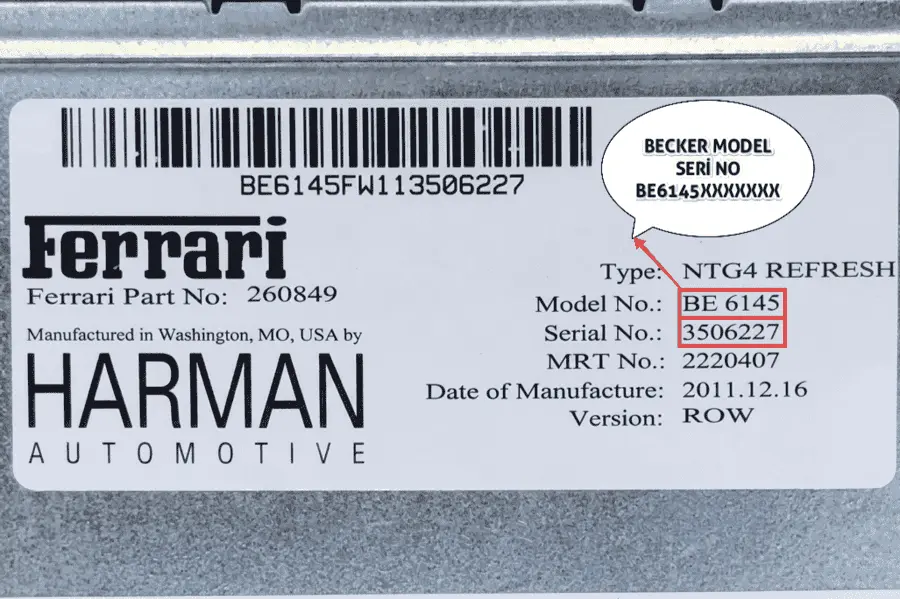
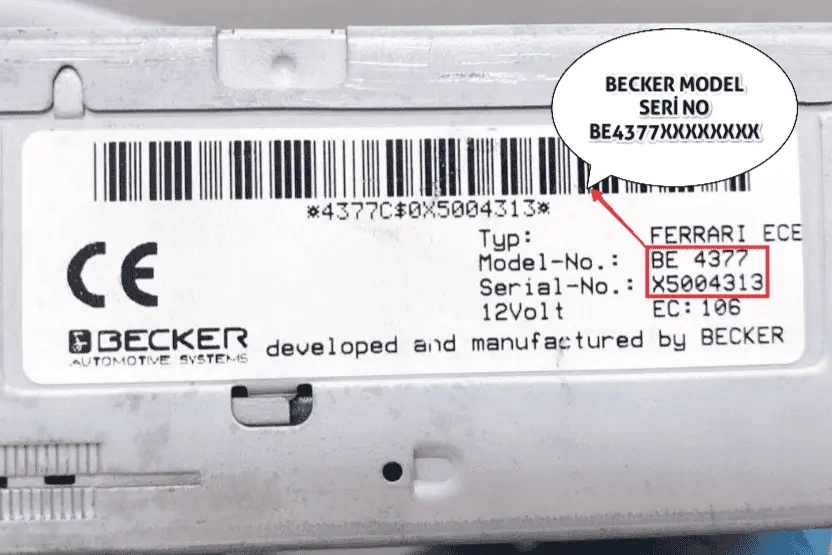
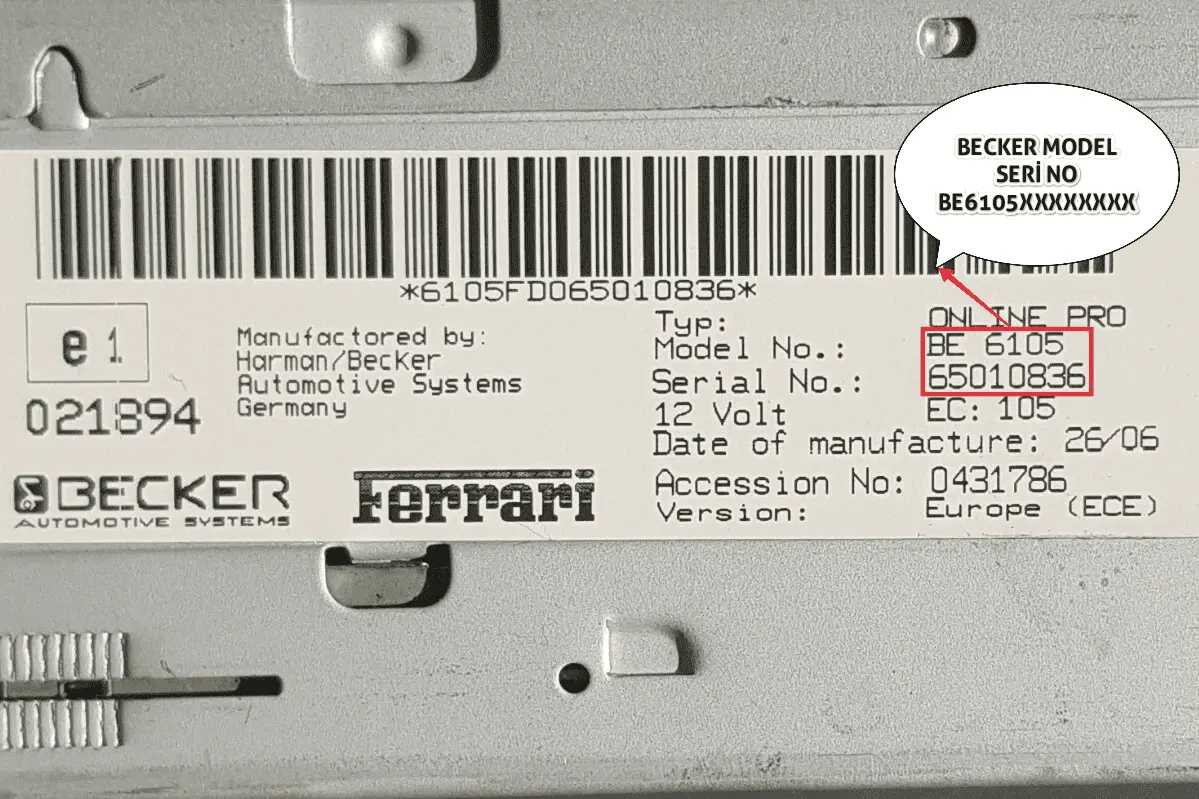
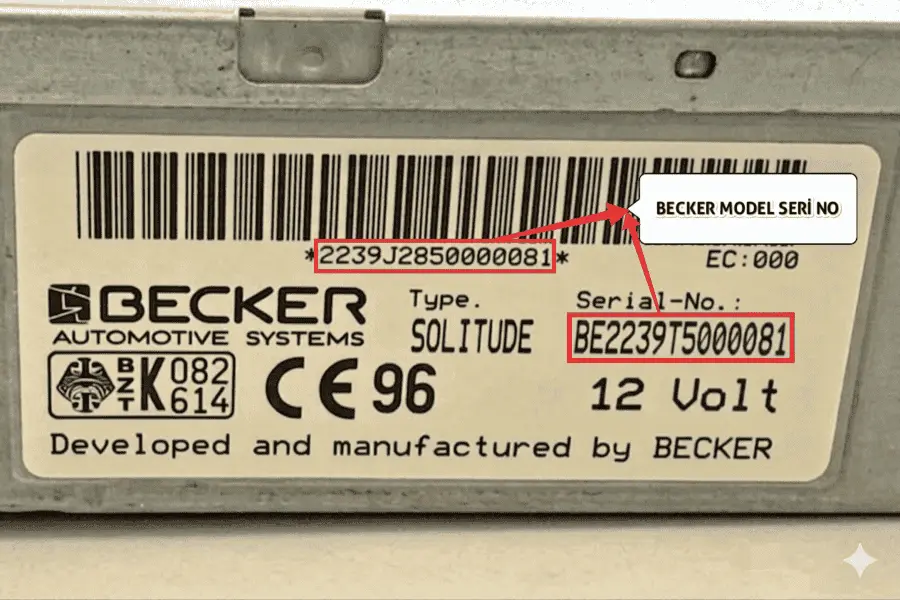
📘 The serial numbers for Becker (Harman/Becker) radio units used in Ferrari vehicles are shown in the images above.
⚙️ To perform a lookup, combine the Model No (e.g. BE 6112) and Serial No (e.g. 65005373) from the label and enter them together into the lookup tool.
🔢 Example serial numbers:
BE611265005373
BE437765004313
BE610565010836
💡 On some labels, the serial number may be printed as a 15-character barcode directly below the barcode (e.g. 6112HE065005373). In this case, you can enter these 15 characters directly into the lookup tool.
⚠️ Supported Becker models: BE2164, BE4370, BE4372, BE4376, BE4377, BE6014, BE6100–BE6109, BE6111–BE6112, BE6120–BE6123, BE6141–BE6145, BE7801, BE7909, and BE6163 — all Ferrari Becker series are supported.
👇 Found your serial number? Click below to look up your code:
Go to Lookup Tool 🚀
- The code is usually entered using preset station buttons 1–4.
- For example, if your code is 4782: press button “1” until “4” appears, button “2” until “7” appears, button “3” until “8” appears, and button “4” until “2” appears. For Becker series, then hold the “6”, “TA” or “SEEK” button for 10–15 seconds to confirm.
Ferrari Becker Series Radio Code Finder Tool
Frequently Asked Questions About Ferrari Radio Codes
When the radio turns on, the display will show “CODE” or “CODE IN” with “0000” on screen. Press preset buttons 1, 2, 3 and 4 repeatedly until the correct digit appears in each position. For example, if your code is 3462: press button “1” three times, button “2” four times, button “3” six times, and button “4” twice. The confirmation button varies by radio series:
- Becker series: Once all four digits are correct, hold the “6” preset button, the “TA” button, or the “SEEK” (▲) button for 10–15 seconds.
We recommend also consulting your vehicle’s owner manual as the confirmation method may vary by model.
There are a few possible reasons:
- Incorrect Serial Number: This is the most common issue. You may have confused the letter “O” with the digit “0”, or “I” with “1”, or missed a character. Carefully re-check the label.
- Replaced Radio Unit: A previous owner may have replaced the original radio. If the vehicle no longer has its factory-fitted radio, the calculated code will not match.
- EEPROM Modification: In rare cases, the radio’s internal memory may have been reprogrammed by a professional service. In this situation, hardware-level intervention is required.
Please double-check your serial number and try again using our online radio code lookup tool.