Citroen Radio Code Finder (Unlock All Models)
Citroën Radio Code Retrieval (All Models)
 |
 |
 |
 |
Hello Dear Citroën Owners,
Did your radio lock and display “CODE”, “LOCKED”, or “Security” after a battery change in your Citroën (C3, C4, C5, Berlingo, Nemo, Jumper, etc.)? To bypass this security measure and get your music back, you need the 4-digit password calculated from your radio’s serial number.
In this guide, we will explain how to find the codes for Philips, Clarion, Blaupunkt, Bosch, Daiichi, Siemens VDO and Continental brand radios used in Citroën vehicles.
If you know your serial number, you can instantly find your code using our Online Radio Code Finder Service below.
Important: Where is the Serial Number?
To calculate the Citroën radio code, you need to remove your radio from its slot and read the label on the casing.
- To remove the radio, insert the appropriate removal tool into the holes on the front panel and pull.
- Note down the part labeled Barcode or Serial No on the label.
Once you have your serial number, you can use the calculation tool below.
Supported Citroën Radio Models
Our online query tool below supports all major brands used in Citroën vehicles:
Philips | Clarion | Blaupunkt | Daiichi | Continental | Siemens VDO
1. Citroën Philips & Clarion Series
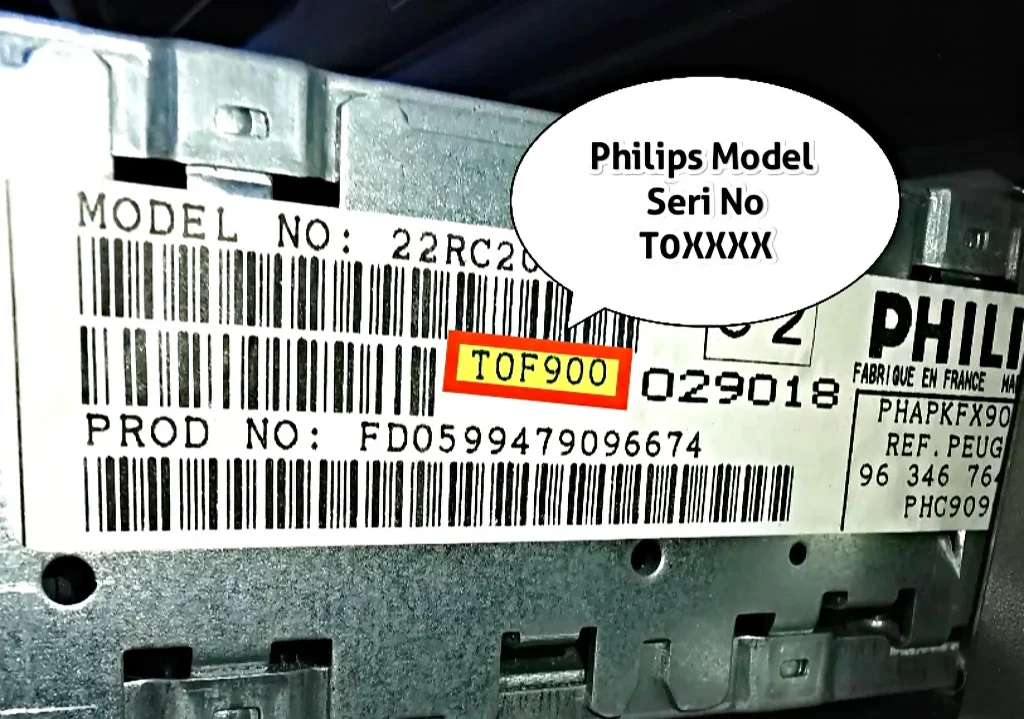
Philips Series: Usually found in older model Citroën Xsara and Berlingo vehicles. The serial number starts with ‘T0’ under the barcode.
How to Enter? You must enter all characters you see in the serial number (e.g., if the label says T0S123, enter the full serial number T0S123 into the box and search).
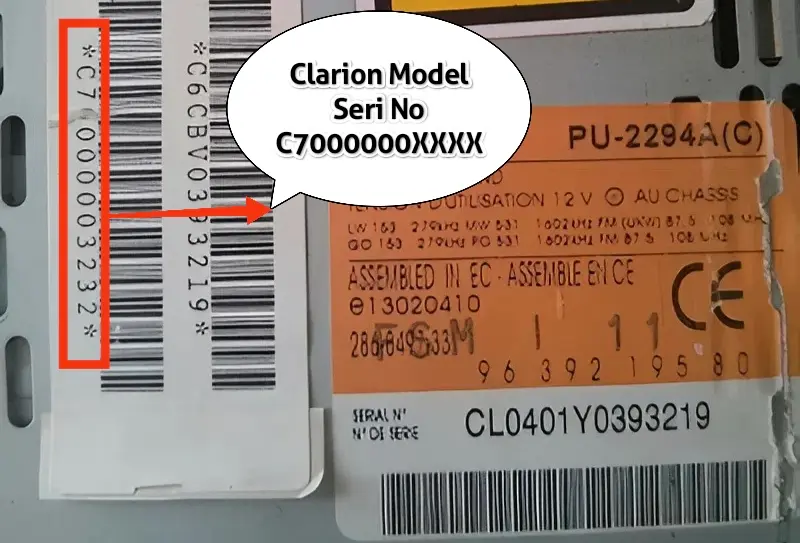
Clarion Series: Frequently seen in Citroën C3 and commercial models. The serial number starts with ‘C7’ and is 12 digits long.
How to Enter? You must enter all 12 digits including C7 (e.g., C70000001234).
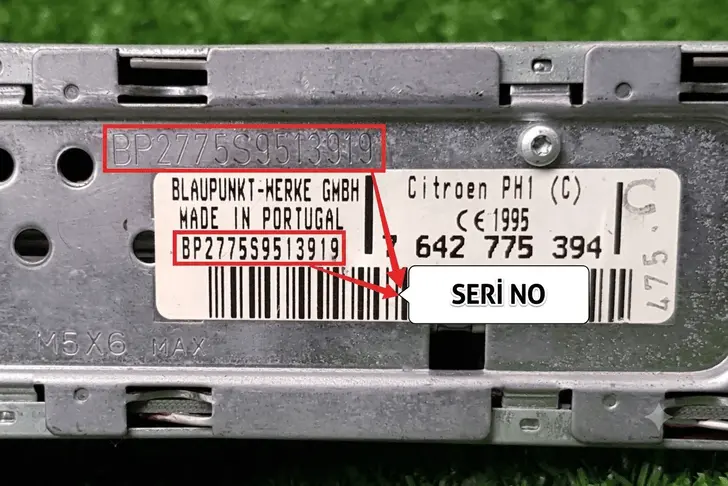
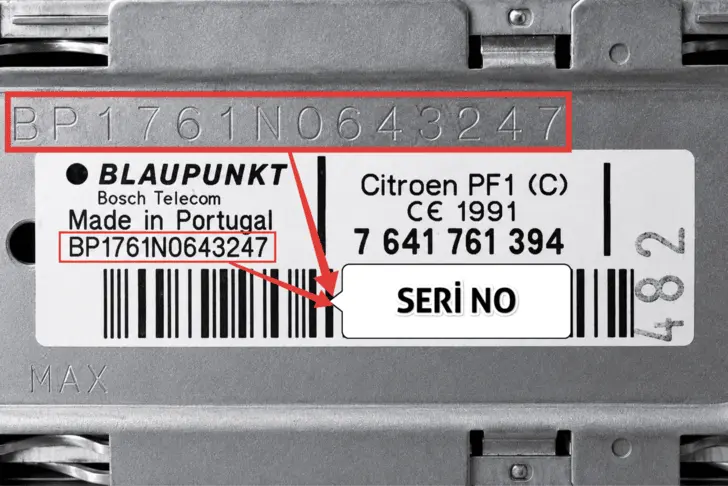
2. Citroën Blaupunkt & Bosch Series (BP, 815… and 905…)
Used especially in Citroën Nemo and Jumper models. There are two types:
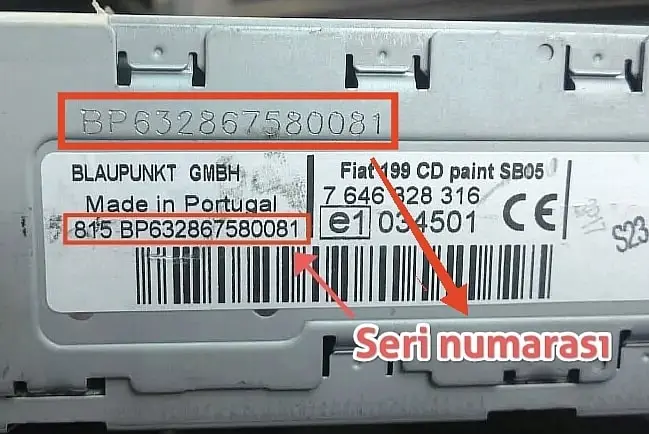
- Standard: Starts with ‘BP’ (14 digits). Enter as is.
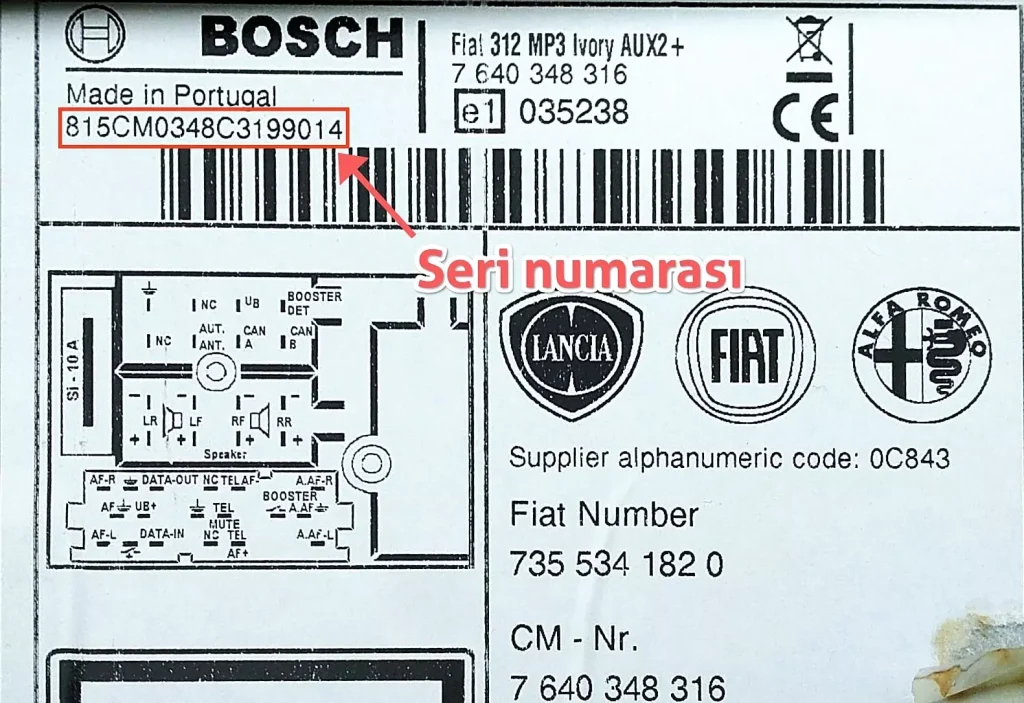
- Special Series (Nemo/Jumper): Serial number starts with ‘815’ or ‘905’ and is 17 digits long (e.g., 815BP… or 905CM…).
Attention: In these series, you must enter the full number completely, including the 815/905 at the beginning.
3. Citroën Daiichi and Continental Series
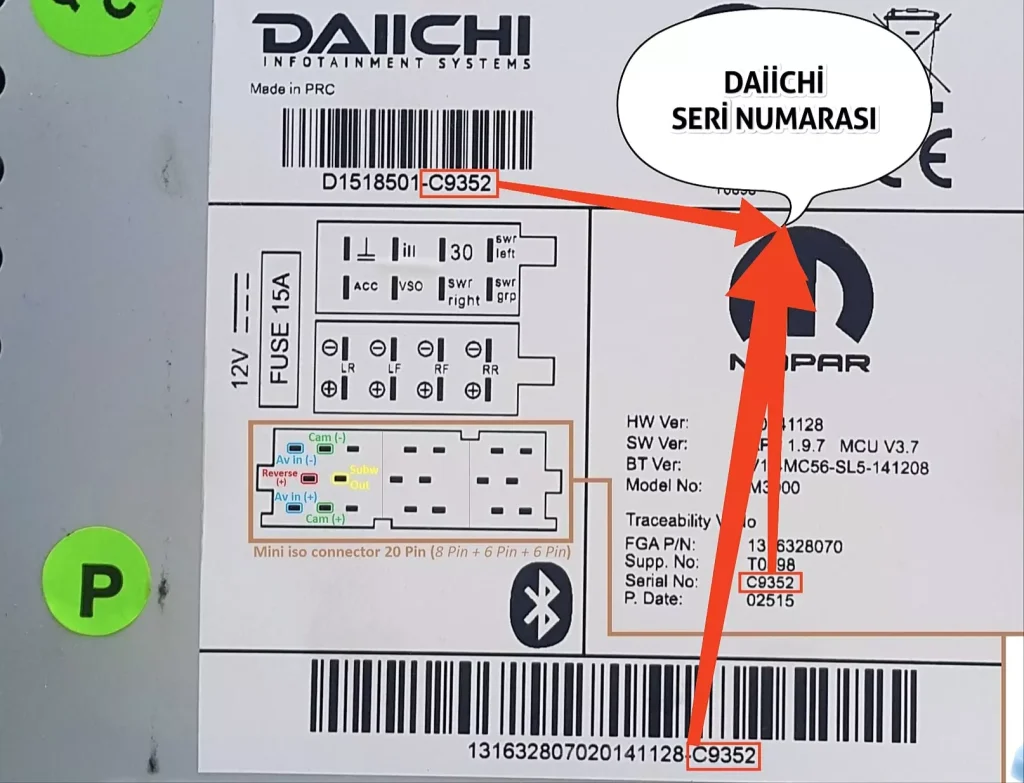
Daiichi: Models with screens found in vehicles like Nemo. It is a 5-digit number or letter+number combination (e.g., A1234 or 12345).
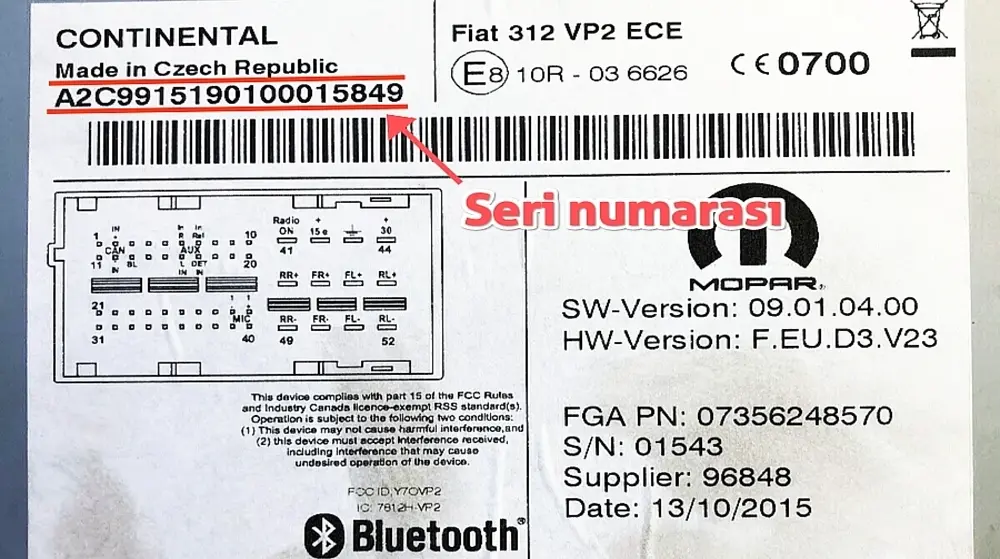
Continental: Found in new generation vehicles, starts with A2C… or A3C…. Enter the full long code.
4. Citroën Siemens VDO Brazil Series
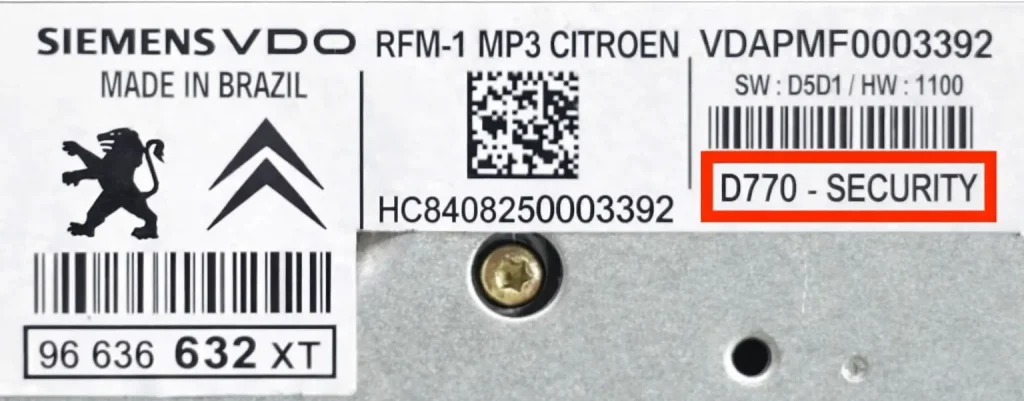
In Siemens VDO RFM-1 MP3 brand radios, the last 4 characters at the end of the barcode or inside the box labeled “SECURITY” (one letter and three digits, e.g., D770) is the “pre-code” serial number information used to calculate the radio password.
5. Citroën Continental Brazil Series
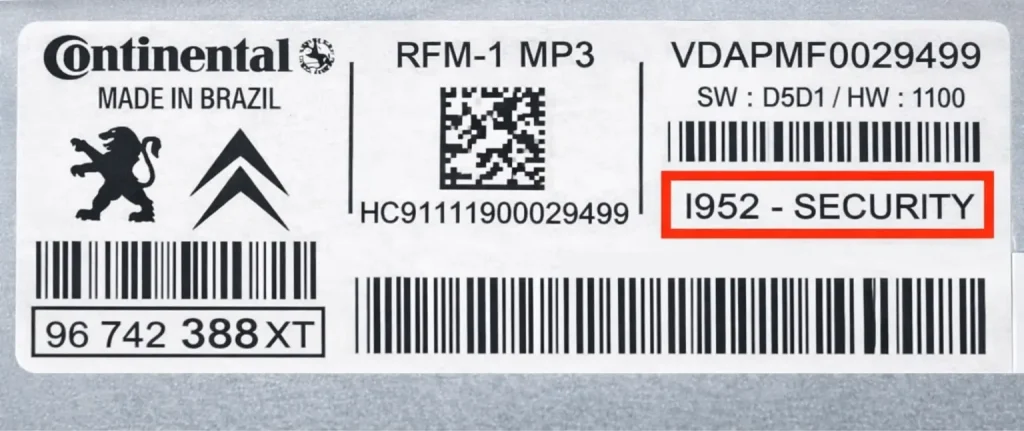
In Continental RFM-1 MP3 brand radios, the last 4 characters to the left inside the box labeled “SECURITY” or next to the barcode on the label (consisting of one letter and three digits, e.g., I952) is the “pre-code” serial number information used to calculate the radio’s lock password (radio code).
Code Entry Process (Continental and Siemens VDO RFM-1 MP3)
Turn on the radio, see “CODE” on the display.
- 1st digit: Press button “1”, set the digit to 8 using < / >.
- 2nd digit: Press button “1” again, set the digit to 1 using < / >.
- 3rd digit: Press button “1” again, set the digit to 7 using < / >.
- 4th digit: Press button “1” again, set the digit to 8 using < / >.
Confirmation: If you see the code 8178 on the screen, press button “1” again to confirm. Note: In some versions, you may need to press and hold button “6” for confirmation.
6. Citroën Philips Series (Starting with PH)
Found in older model Citroen vehicles. Serial number starts with ‘PH‘ letters and consists of 14 digits total.
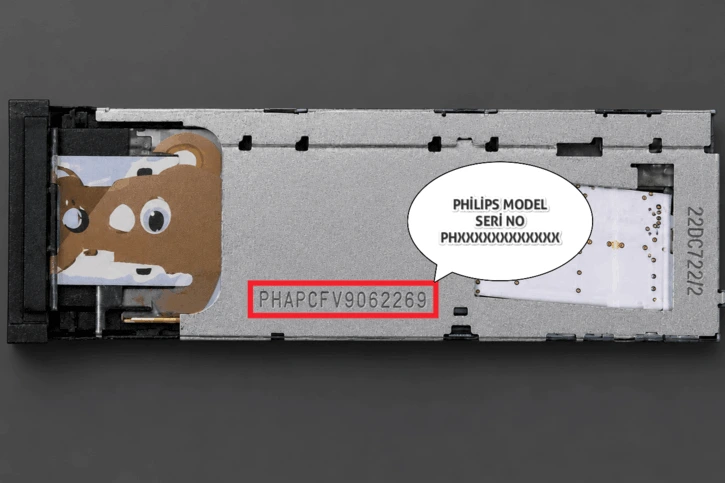
How to Enter? Enter the complete serial number (Example: PHAPEF56789012) into the inquiry tool.
Tip: Even if the label on Philips radios is worn, the serial number is usually engraved/stamped on the metal case of the radio (on the side surface). Please also check the metal surface.
Turn on the radio, “CODE” and then “- – – -“ dashes will appear on the screen.
- Enter your code directly using the number buttons (Preset) on the radio.
- For example for 1234: Press buttons 1, 2, 3 and 4 in sequence.
- After typing the correct password, press the “+>” (or right arrow) button to confirm.
Code Entry Procedure (Citroen Blaupunkt & Bosch)
Turn on the radio, see “CODE” or “—-“ text on the screen.
- 1st digit: Press the “1” button repeatedly to set the first number.
- 2nd digit: Press the “2” button to set the second number.
- 3rd digit: Press the “3” button to set the third number.
- 4th digit: Press the “4” button to set the fourth number.
Confirmation: When you have entered the password correctly, to confirm, press and hold the “5”, “6” or “>>” button (depending on the model) until you hear a beep.