Jaguar Radio Code Finder – Unlock X-Type, S-Type & XJ Instantly
Jaguar Radio Code Finder (X-Type, S-Type, XJ and Others)
 |
 |
Hello Dear Jaguar Owners,
Do you see “CODE”, “PLEASE WAIT” or “LOCKED” warnings on your screen after a battery change, electrical failure, or radio replacement in your Jaguar (X-Type, S-Type, XJ, XF, etc.)? This is Jaguar’s original anti-theft security protocol. We allow you to find the 4-digit unlock code required to reactivate your multimedia system within seconds (Click to Query).
This guide covers all original sound systems used by Jaguar, including Alpine and Visteon (M Series and IAM Series).
Step 1: Finding the Serial Number (Without Removing the Radio!)
In order to calculate your Jaguar radio code, we need the “Identification Number” (Serial No) located on the back or side of the device.
Practical Method (X-Type & Visteon Models):
If your vehicle is a Jaguar X-Type or your radio is Visteon based, you may be able to display the serial number on the screen without removing the unit:
-
-
- Turn on the ignition and ensure the radio is off (displaying “CODE”).
- Press and hold buttons 2 and 6 (or 6 and >> forward seek on some models) simultaneously.
- The screen cycle will begin. At the end of this cycle, you will see a 7-digit code starting with the letter “M” (e.g., M123456).
- If this method does not work, you will unfortunately need to remove the radio.
-
Exact Method (Label Check):
Especially for Alpine manufactured radios (S-Type, XJ series) and cases where the button combination doesn’t work, you must remove the radio unit from the dashboard. Note down the part that says “Serial No” on the label on the metal casing.
2. Supported Models and Serial Number Formats
Our system supports the following 3 different serial number formats used in Jaguar vehicles:
A) Jaguar Alpine Series (Starting with J)
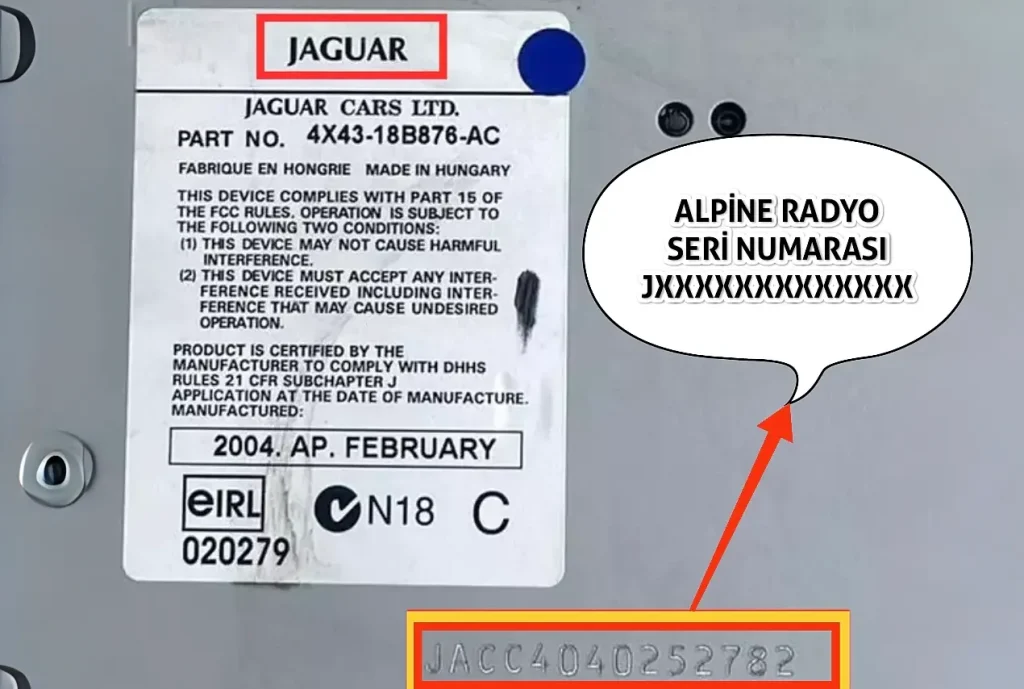
Usually units manufactured by Alpine. The serial number starts with the letter ‘J’ and is 14 characters long.
Example: JACC2020536216
Note: You must enter the full 14-digit serial number for this model.
B) Jaguar Visteon Series (M Series)
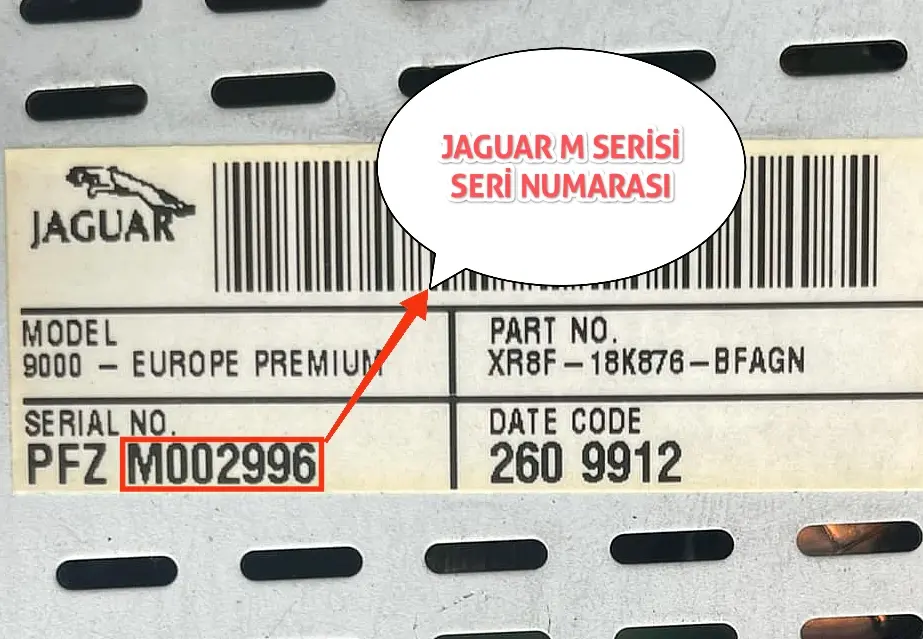
Found in Jaguar models (Usually X-Type). The serial number starts with the letter ‘M’ and is 7 characters long.
Example: M123456
Note: Entering the letter ‘M’ followed by the 6 digits is sufficient.
C) Jaguar Visteon (IAM Series)
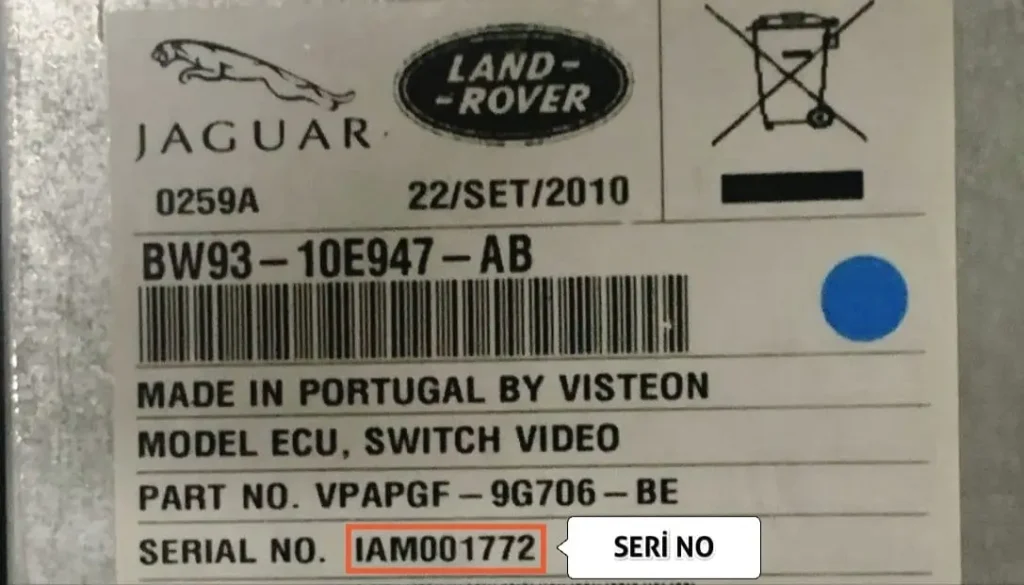
Encountered in newer generation units. The serial number starts with the ‘IAM’ prefix and is 9 characters long.
Example: IAM123456
Note: Enter the 9 characters including ‘IAM’ into the box.
Jaguar Radio Code Calculation Tool
Found your serial number? Enter it in the box below and get your Jaguar code instantly.
Frequently Asked Questions (FAQ) and Tips
The following method is generally used to enter the code:
- 1. Rakam için (For 1st digit): Press the “1” button repeatedly until the correct digit appears.
- 2. Rakam için (For 2nd digit): Use the “2” button.
- 3. Rakam için (For 3rd digit): Use the “3” button.
- 4. Rakam için (For 4th digit): Use the “4” button.
Confirmation: After seeing the correct code on the screen, press and hold “PTY”, “A.MEM” or the right arrow key (>>) to confirm, depending on your model.
This warning indicates that too many incorrect codes have been entered previously. The radio has temporarily locked itself.
Solution: Leave the vehicle in a safe place with the ignition on (or engine running) and the radio turned on. After waiting for approximately 30 minutes to 1 hour, the text will disappear and the “CODE” entry screen will return.
No, this method is unreliable because the radio unit might have been changed previously. For accurate results, you must use the serial number starting with J, M, or IAM found on the radio label.