Alfa Romeo Radio Code Finder (All Models) – Instant Unlock
Alfa Romeo Radio Code Finder (All Models)
 |
 |
 |
 |
Hello Dear Alfa Romeo Owners,
Did your music stop and did a “CODE”, “Enter Code”, or “Radio Blocked” warning appear on the screen after a battery change or radio removal in your Alfa Romeo (Giulietta, MiTo, 159, 147, GT, Brera, etc.)? This indicates that your multimedia system has entered anti-theft security mode. Finding the 4-digit original radio code you need is much easier than you think.
In this guide, we will explain in detail how to access radio codes for all head unit models frequently used in Alfa Romeo vehicles, such as Bosch, Blaupunkt, Continental, Philips, and Harman.
If you already know your serial number, you can calculate your code in seconds using our Online Alfa Romeo Radio Code Finder Service at the bottom of the page.
Important Step: How to Find Alfa Romeo Radio Serial Number?
To generate your code, we need the serial number (Serial No), which is the identity of your radio. In Alfa Romeo models, you usually need to remove the radio to access this number.
Method 1: Radio Button Combination (Older Models)
- On some older Blaupunkt (Alfa 147/156) models, holding down buttons [1] & [6] or [SRC] may display the serial number on the screen.
- However, the most reliable method is always to check the label.
Method 2: Removing the Radio (Definite Solution)
- For models like Giulietta, MiTo, and 159, you need to insert “U” shaped removal tools (or thin screwdrivers/wires) into the holes on the front panel and pull the radio towards you.
- Find the barcode area starting with “BP”, “CM”, “PH”, or “A2C” on the radio label.
After noting down your serial number, you can use our online tool at the bottom of the page.
Supported Alfa Romeo Radio Brands
Our online lookup tool below supports major head unit manufacturers used in Alfa Romeo vehicles:
Blaupunkt | Bosch | Continental (Uconnect) | Philips | Harman
1. Blaupunkt & Bosch Series (Alfa 147, 156, GT, 159)
The most common radio brands in legendary Alfa Romeo models (147, 156, GT, and some 159s) are Blaupunkt and Bosch. The serial number on the label usually starts with the letters ‘BP’ followed by a 12-digit number (e.g., BP937812345678).
Sometimes it may start with the code ‘CM’ or ‘815’. For calculation, we might need that long number starting with BP or the part number starting with 7 64… on the label.
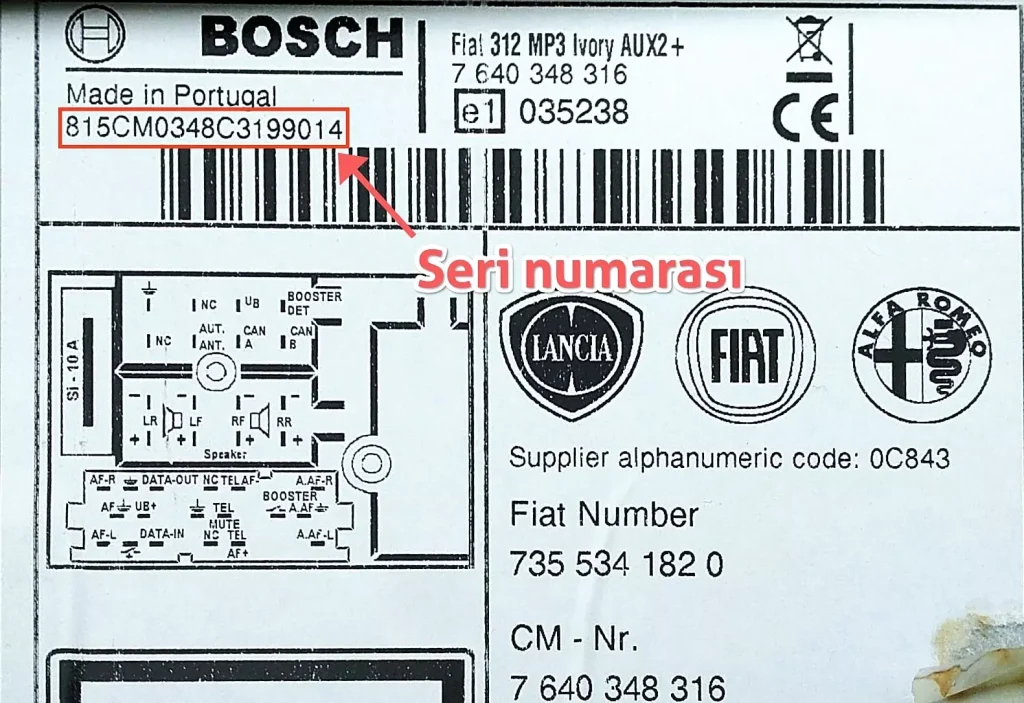
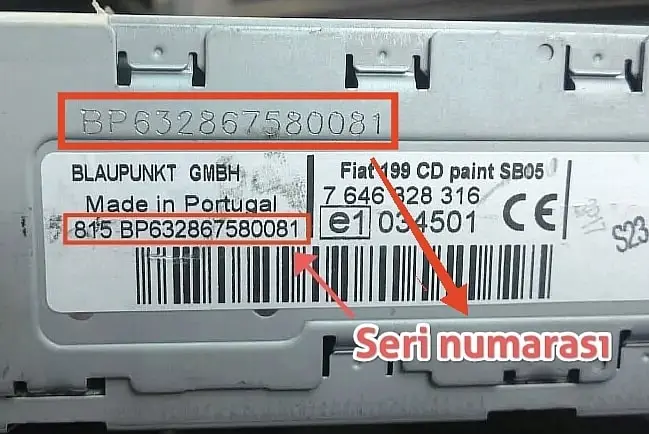
2. Alfa Romeo Continental (Uconnect) Series
Touchscreen Uconnect systems found in newer generation Alfa Romeo Giulietta and MiTo models are usually produced by Continental. The serial number starts with ‘A2C’ & ‘A3C’ or ‘TV’ and is quite long (14-17 characters). E.g., A2C5340663800001856,TVPQN0791H017D
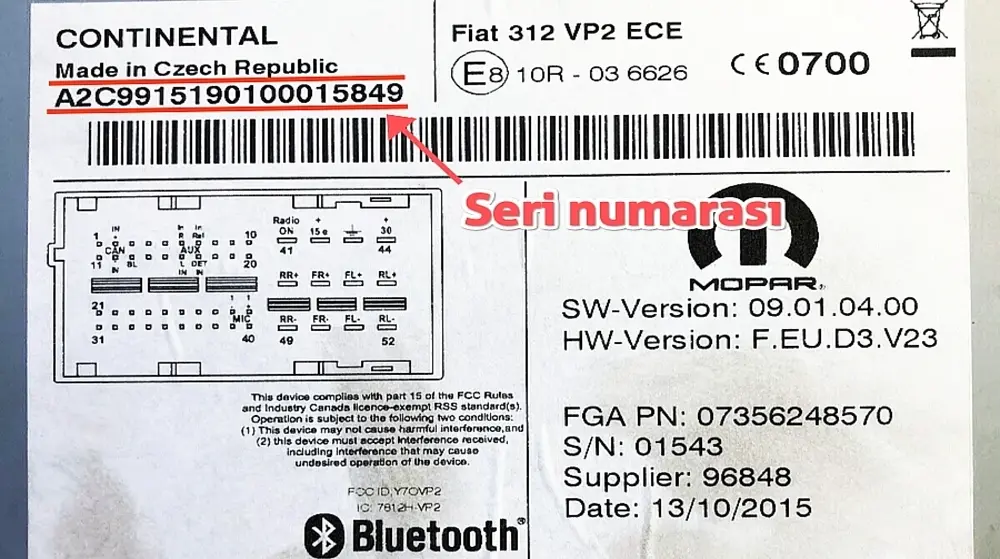
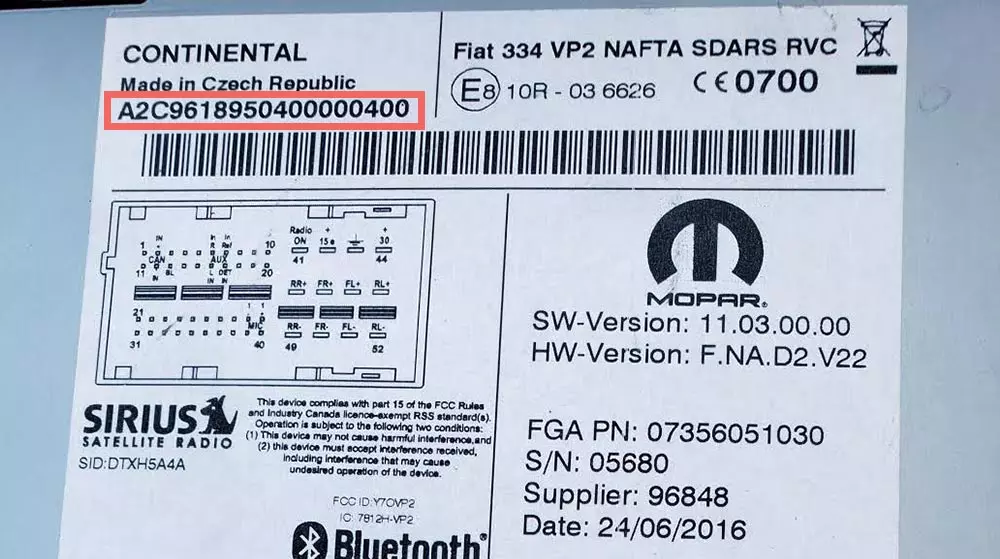
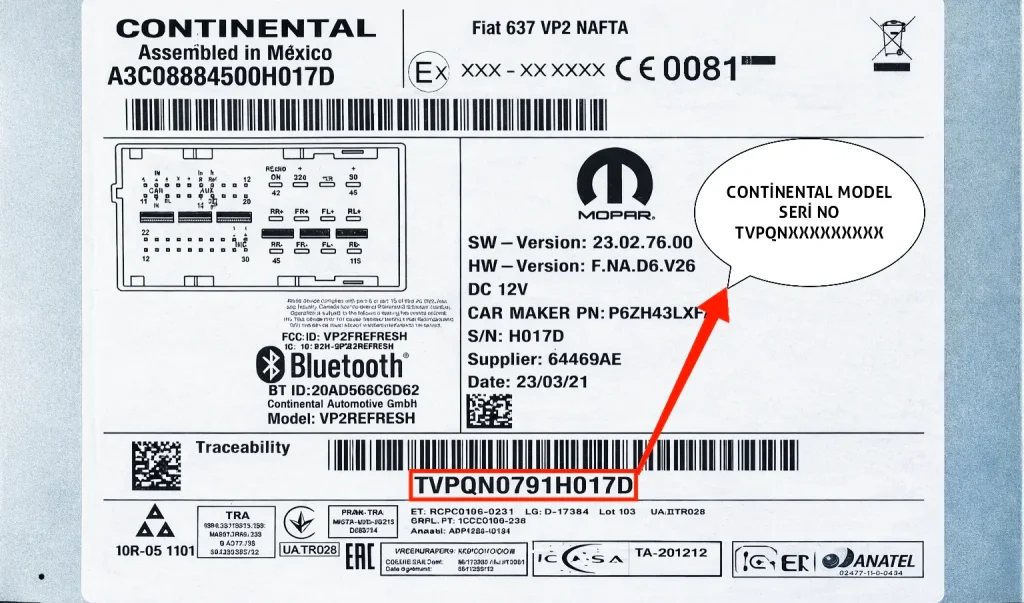
3. Harman Series (T00BE… or 5 Digits)
Harman (Harman Kardon/Becker) brand navigation and multimedia units are used in some special trim Alfa Romeo models. Serial numbers on the labels of these radios can be found in two different formats, and our system supports both:
- Format 1 (Long Code): Usually starts with the letters ‘T00BE’ or ‘TOOBE’ followed by a total of 14 or 15 characters (e.g., T00BE123456789).
- Format 2 (Short Code): Some models have a shorter serial number consisting of only 5 digits (e.g., 54321).
Enter whichever format you see on the label exactly into the query screen.
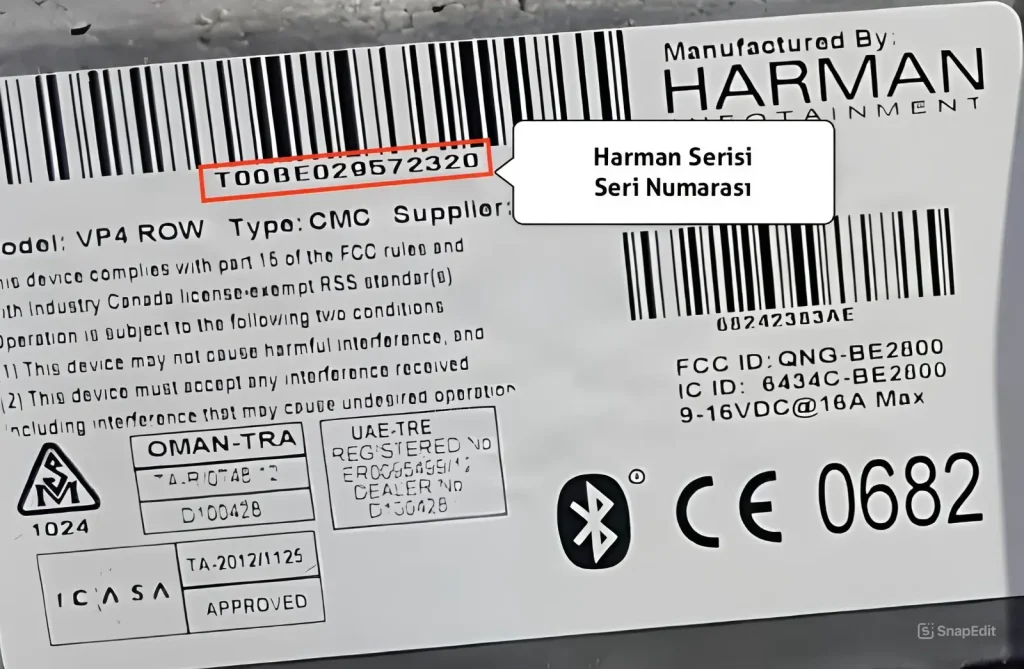
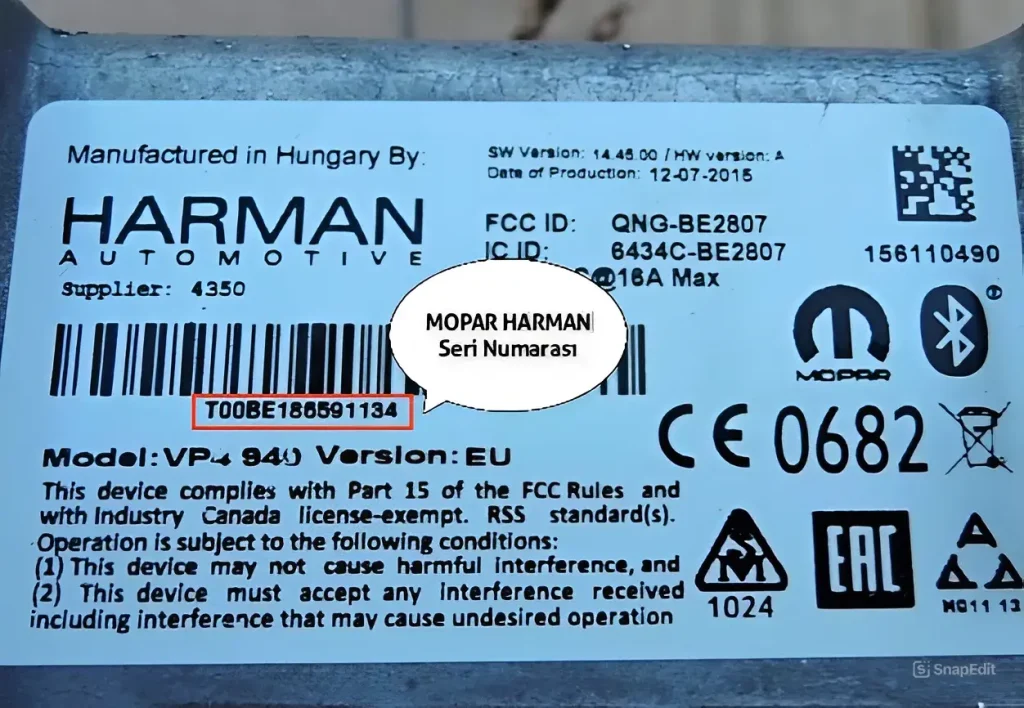
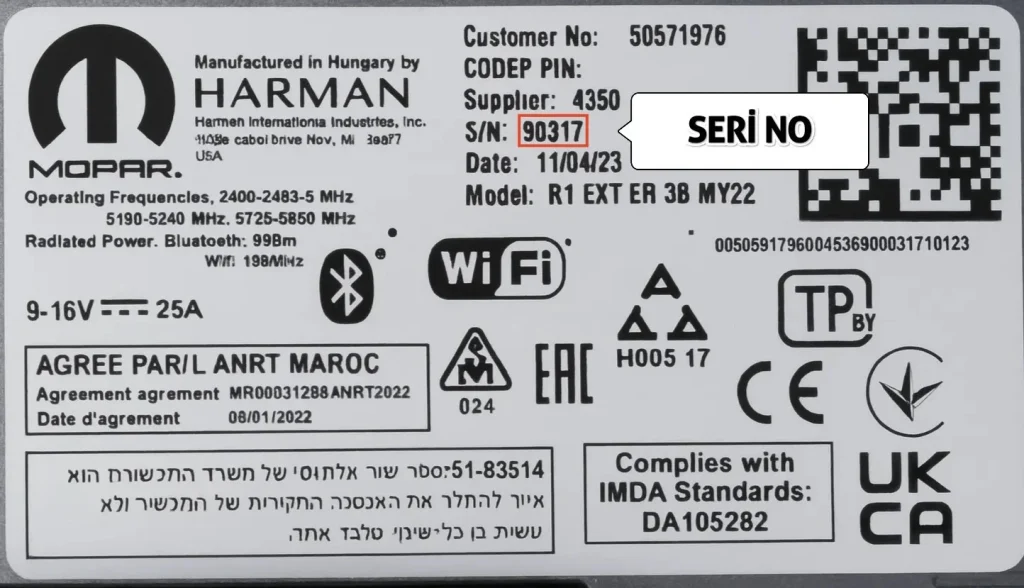
4. Alfa Romeo Philips Series (Starting with PH)
Philips brand radios are quite common in classic models like Alfa Romeo GTV, Spider, 156, and 145/146. The serial numbers of these devices always start with the letters ‘PH’.
You need to note down the code seen on the label as PHACxxxxxx, PHAPxxxxxx, or PH123xxxxxx exactly.
Tip: Even if the label on Philips radios is worn out, the serial number is usually engraved/stamped on the metal casing (side surface). Please check the metal surface as well.
Enter the correct serial number you obtained from the sections mentioned above into our online decoder tool below to learn your radio code instantly.
Alfa Romeo Radio Code Finder Software;
Frequently Asked Questions (FAQ) About Alfa Romeo Radio Code
If your radio is locked due to incorrect code entries, you may see “WAIT” or a countdown on the screen. What you need to do is leave the vehicle and the radio in the ON position (ignition half open) for about 1 hour without interruption. When the time is up, the radio will allow “CODE” entry again.
Usually yes. Especially on Alfa 147, 156, and GT models with Blaupunkt radios, the serial number starts with BP (e.g., BP937xxxxx). However, on newer models like Giulietta and MiTo, there are Continental brand radios, and they start with A2C. Also, Philips (PH) and Harman (T00BE) series are available. Our system supports all these formats.
The most common reason is misreading characters in the serial number (e.g., confusing letter ‘B’ with number ‘8’). Also, if the radio in the vehicle has been changed before (spare part), the transaction must be done from the label on the radio itself, not from the chassis number of the vehicle.
Please check your serial number again and try again in our online radio code lookup tool above.